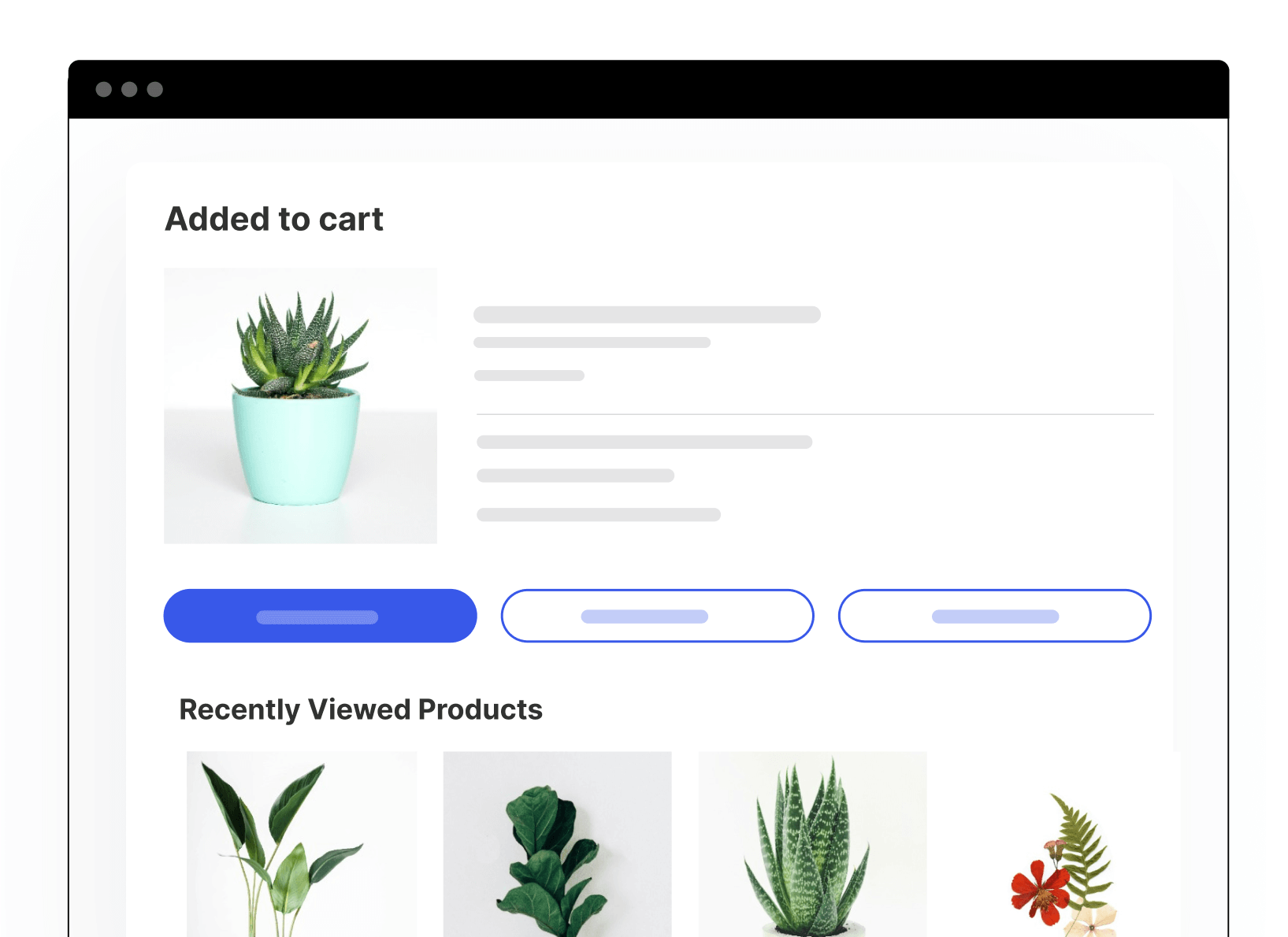
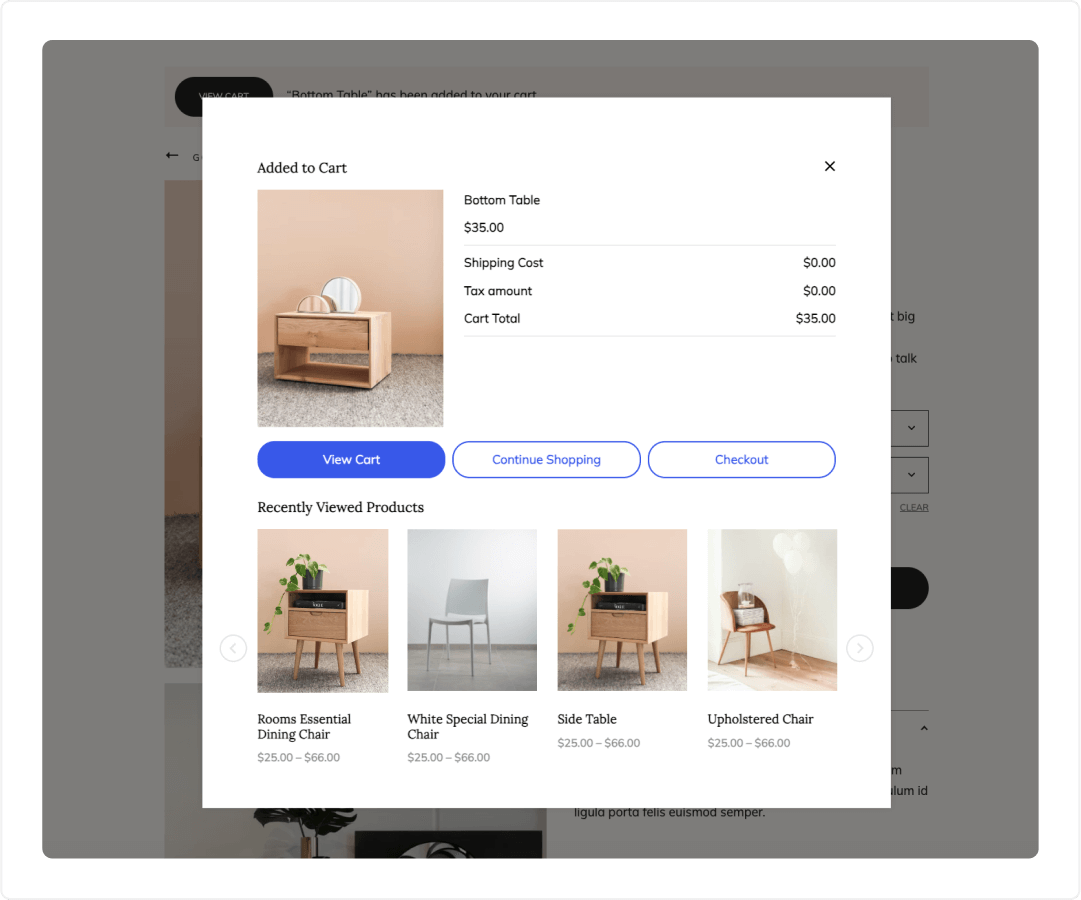
Enhance your store's shopping experience

Display a dynamic popup whenever an item is added to the cart. Confirm the product has been added successfully while strategically promoting related products to drive additional revenue.

WordPress Built exclusively for WooCommerce

WordPress Trusted by 10,000+ WordPress websites

Why Use An Added to Cart Popup

  • Icon check Provide a smooth and engaging shopping experience by confirming the product has been added to the cart and showing call-to-action buttons for the next step
  • Icon check Capitalize on the moment customers add items to their cart by presenting targeted product recommendations
Flexible Content & Display Options

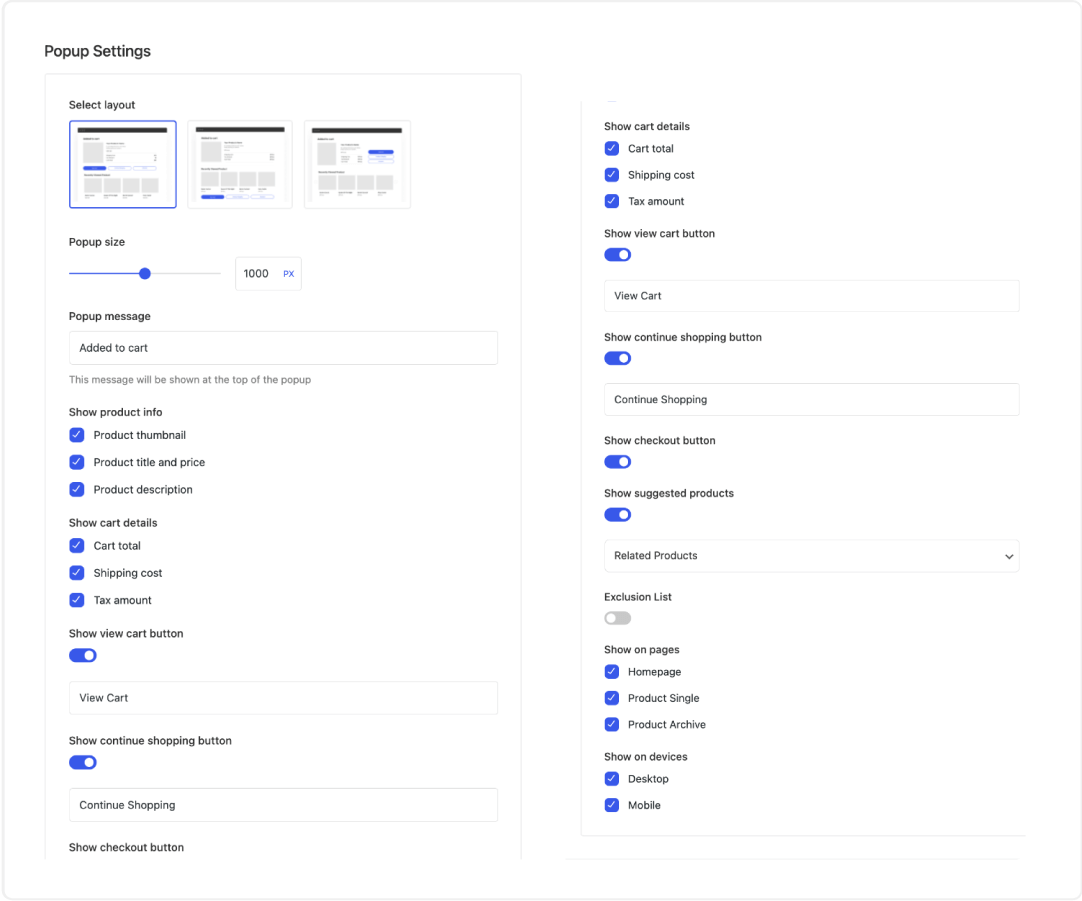
  • Icon check Choose what information to display in the popup, including product details, cart information, and call-to-action buttons
  • Icon check Promote related products, recently viewed items, frequently bought together products, or "Buy X, Get Y" deals to encourage additional purchases
  • Icon check Control when and where the popup appears using exclusion conditions, page targeting, and user device targeting
Easy Setup & Customization

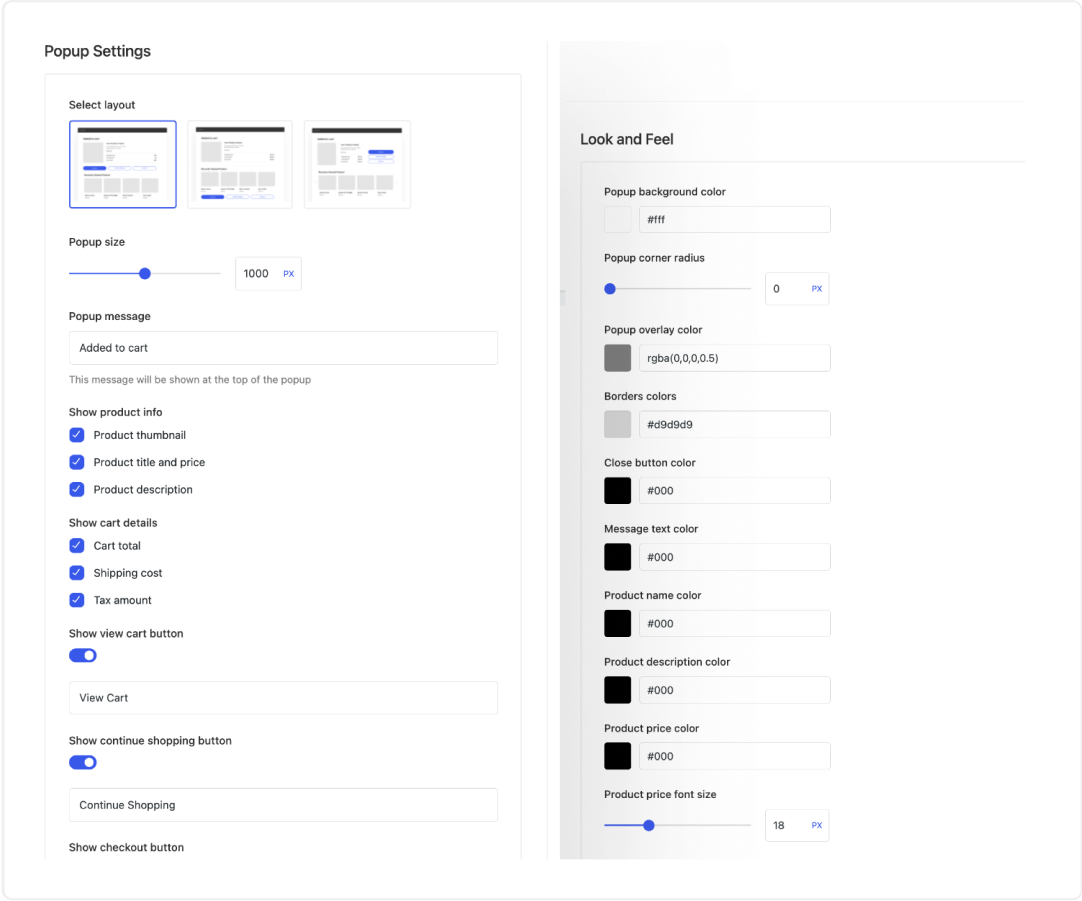
  • Icon check Tailor the popup’s appearance to match your store’s branding with options for layout, colors, font sizes, and corner radius
  • Icon check Activate the Added to Cart Popup module in just a few clicks and configure the settings using a user-friendly interface with a real-time preview

Get Started in Minutes

Creating an added to cart popup with Merchant Pro is a breeze. Simply install the plugin, enable the Added To Cart Popup module, and configure your desired settings. No coding or technical knowledge required!

More modules you'll love

Merchant Pro is packed with over 40 modules specifically designed to help WooCommerce store owners increase conversion rates, reduce cart abandonment, and improve customer experience.

Icon for Product Bundles

Product Bundles

Increase your average order value by creating bundles of products to be sold together.

Icon for Bulk Discounts

Bulk Discounts

Offer discounts for buying multiple items to encourage larger purchases.

Icon for Buy X, Get Y

Buy X, Get Y

Create offers where buying a certain quantity of one product triggers a discount on another, e.g. Buy 1, Get 1.

Icon for Spending Goal

Spending Goal

Motivate higher average order values by offering discounts for reaching spending targets.

Icon for Free Gifts

Free Gifts

Reward customers with a gift for hitting a spending target or using a coupon.

Icon for Storewide Sale

Storewide Sale

Easily create tailored discount campaigns for your entire store or specific categories/products.

Icon for Frequently Bought Together

Frequently Bought Together

Create discounted bundles of related products that customers can add to their cart with just one click

Icon for Cart Reserved Timer

Cart Reserved Timer

Create a sense of urgency by informing visitors that cart items are only reserved for a limited time.

Icon for Pre-Orders

Pre-Orders

Allow customers to pre-order out-of-stock or upcoming products to generate revenue.

Icon for Waitlist

Waitlist

Allow customers to join an email waitlist for out-of-stock products and notify them when restocked.

Icon for Countdown Timer

Countdown Timer

Create a sense of urgency by displaying a countdown timer on discounted products.

Icon for Stock Scarcity

Stock Scarcity

Inform visitors when stock is running low on products they are viewing.

Icon for Advanced Reviews

Advanced Reviews

Enhance customer reviews with features like photo uploads, review summary, and sorting options.

Icon for Google Address Autocomplete

Google Address Autocomplete

Streamline checkout by autocompleting address fields using the Google Places API.

Icon for Size Chart

Size Chart

Display a size chart on specific or all products to reduce returns and increase sales.

Icon for Variation Swatches

Variation Swatches

Display variable product options as customizable color/image icons, buttons, or dropdowns.

Icon for Sticky Add To Cart

Sticky Add To Cart

Display a bar that remains visible as the user scrolls on product pages with product details and an add to cart button for easy access.

Icon for Wishlist

Wishlist

Allow customers to save and share products they are interested in.

Icon for Real-Time Search

Real-Time Search

Implement predictive search to help visitors instantly find products.

Icon for Product Video

Product Video

Upload videos to be viewed in product galleries and on archive pages.

Icon for Product Audio

Product Audio

Upload audio to be listened to in product galleries and on archive pages.

Icon for Added To Cart Popup

Added To Cart Popup

Show a popup with product recommendations when items are added to the cart.

Icon for Quick View

Quick View

Enable users to view product details without leaving the current page.

Icon for Product Labels

Product Labels

Create customizable labels/badges for products based on conditions (e.g. by product category).

Icon for Checkouts

Checkouts

Choose from three different checkout layouts (Shopify-style, Multi-step, or One-page).

Icon for Recently Viewed Products

Recently Viewed Products

Display recently viewed products on product pages and in the cart.

Icon for Buy Now

Buy Now

Allow customers to bypass the cart and go directly to checkout with Buy Now buttons.

Icon for Product Navigation Links

Product Navigation Links

Facilitate easy navigation between products with next/previous links.

Icon for Side Cart

Side Cart

Introduce a sliding side cart that appears when customers add products to their cart.

Icon for Login Popup

Login Popup

Enable users to log in using a simple popup.

Icon for Payment Logos

Payment Logos

Show accepted payment methods to visitors.

Icon for Cookie Banner

Cookie Banner

Inform visitors that your site uses cookies.

Icon for Animated Add to Cart

Animated Add to Cart

Add animations to the Add To Cart button to make it stand out.

Icon for Add To Cart Text

Add To Cart Text

Customize the text on Add to Cart buttons for various product types.

Icon for Trust Badges

Trust Badges

Display trust badges on product pages to build customer confidence.

Icon for Brand Image

Brand Image

Add brand images to product pages.

Icon for Quick Social Links

Quick Social Links

Display floating social media icons for easy customer connection.

Icon for Reasons To Buy List

Reasons To Buy List

Provide a summary of key features and benefits for your products.

Icon for Cart Reserved Timer

Cart Reserved Timer

Create a sense of urgency by informing visitors that cart items are only reserved for a limited time.

Icon for Scroll To Top Button

Scroll To Top Button

Provide an easy way for customers to return to the top of the page.

Icon for Agree To Terms Checkbox

Agree To Terms Checkbox

Require customers to agree to your Terms & Conditions during checkout.

Icon for

Icon for Auto External Links

Auto External Links

Automatically open external links in a new browser tab to keep users on your site.

Icon for Cart Count Favicon

Cart Count Favicon

Display the number of items in the cart in the browser's favicon.

Icon for Inactive Tab Message

Inactive Tab Message

Modify the browser tab's title when visitors navigate away to reduce cart abandonment.

What Our Customers Say

I have the Pro version of Merchant, and it is worth every penny. It combines the features that you would normally need multiple plugins for into one convenient plugin that’s easy to use. If you want to save money by using WooCommerce, but you want all the functionality offered in Shopify, grab this plugin.

Elle E. Kay

Best-Selling Author

I’ve tested the Merchant Pro plugin from aThemes and I find it very complete and beneficial for a successful online store.

The customer service is excellent, answers and help are fast and top notch.

Sonia

Business Manager at Yamaniya

Merchant Pro has significantly enhanced my WordPress eCommerce experience. The user-friendly interface and responsive support make this plugin a must-have choice. I highly recommend Merchant Pro!

Christian Laborde

Co-Founder of Zipangu

Excellent

Rated 4.7 out of 5 based on 70+ reviews

Personal

1 WEBSITE

normally $ 99
$ 79
/year
Save $20 (20% OFF)
Includes $0 first-year discount + $0 bundle savings Icon
Buy Personal
  • All Merchant Pro Modules

    All-in-one WooCommerce plugin with 45+ modules to boost sales, increase AOV and enhance the customer experience

  • All 40+ Modules
  • Premium Support

    Get premium support and expert guidance whenever you need it from our dedicated team

SUPPORT

12 months premium support included. Extend for $49/year.

Professional

10 WEBSITES

normally $ 199
$ 159
/year
Save $40 (20% OFF)
Includes $0 first-year discount + $0 bundle savings Icon
Buy Professional
  • All Merchant Pro Modules

    All-in-one WooCommerce plugin with 45+ modules to boost sales, increase AOV and enhance the customer experience

  • All 40+ Modules
  • Premium Support

    Get premium support and expert guidance whenever you need it from our dedicated team

SUPPORT

12 months premium support included. Extend for $49/year.

Agency

100 WEBSITES

normally $ 399
$ 319
/year
Save $80 (20% OFF)
Includes $0 first-year discount + $0 bundle savings Icon
Buy Agency
  • All Merchant Pro Modules

    All-in-one WooCommerce plugin with 45+ modules to boost sales, increase AOV and enhance the customer experience

  • All 40+ Modules
  • Premium Support

    Get premium support and expert guidance whenever you need it from our dedicated team

  • White Label Plugin

    Hide everything related to Sydney’s branding and replace it with your own branding

SUPPORT

12 months premium support included. Extend for $49/year.

14

Our 100% No-Risk Money Back Guarantee!

We're excited to have you experience Merchant Pro. Over the next 14 days, if Merchant Pro isn’t the best fit, simply reach out! We’ll happily refund 100% of your money. No questions asked.

Yours sincerely,
Jared Atchison
President, aThemes

Special introductory pricing, all renewals are at full price. You can change plans or cancel your subscription from your account area at any time. Lifetime licenses include lifetime access, lifetime updates and 12 months of support. Any applicable taxes will be calculated at checkout based on your location.

Get the All Access Pass – Every Product From $159

Get full access to Sydney Pro, Addons Pro, Botiga Pro, and Merchant Pro with one pass.

Save up to 66%
  • Icon Access all 4 premium WordPress products
  • Icon Premium support & frequent updates
  • Icon Best value for WordPress creators
  • Icon Choose annual or lifetime access
Get All Access

Frequently asked questions

The module offers:

- 3 different popup layouts to choose from
- Ability to set popup width
- Options to show/hide product info, cart details, action buttons
- 4 types of suggested products that can be shown
- Ability to exclude certain products/categories
- Control over where the popup appears (homepage, product pages, etc.)
- Responsive options to enable/disable on desktop vs mobile

The Look and Feel settings allow you to customize:

- Background, border and text colors
- Corner radius of the popup and buttons
- Overlay color and opacity
- Font sizes
- Button styles

Still have questions?

Start with our Added to Cart Popup documentation. If you can’t find what you’re looking for or want to get in touch, our friendly team is just a click away at our Support Hub.

Visit Support Hub

Grow your WooCommerce store with Merchant Pro