If you want to publish courses online or create your own learning management system (LMS), this collection of the best LearnDash WordPress themes can help.
Although these themes should work with all of the best online learning plugins for WordPress, they have all been built to integrate seamlessly with LearnDash.
As LearnDash is probably the best LMS plugin for WordPress, combining that plugin with one of these themes should provide you with everything you need to publish one or two courses online, build your own eLearning platform, or create almost any type of online course or educational website with WordPress.
If you’re not sure if this is the right LMS plugin for you, our LearnDash review covers the pros and cons of this tool.
Most of these WordPress LearnDash themes are highly flexible, including powerful customization controls and page builder tools. So when checking out the website demos, remember that it should be easy to make any changes that you feel are necessary.
If you’ve chosen to use LearnDash to add online learning features to your website, these themes will take care of the design and user interface aspects of your site.
LearnDash is a plugin, not a theme, so you pair it with a WordPress theme that handles your site’s design. For most people, the best all-round pick is aThemes’ own Sydney, which is free to start and ships a ready-made LearnDash demo. If you are building a learning community with its own mobile app, BuddyBoss is the standout choice (though the priciest). For a fast, lightweight base, Astra is officially recommended by the LearnDash team and free to start.
The rest of this list covers dedicated education themes that ship LearnDash-ready demos, so you can match the design to your subject and budget. Here are the best LearnDash themes compared.
| Theme | Price | Best for |
|---|---|---|
| Sydney | Free; Pro from $79/yr | Flexible, easy LMS starter |
| BuddyBoss | From $299/yr | Learning communities and mobile apps |
| Educavo | $49 | Elementor-based education sites |
| Anesta | $69 | Community and intranet sites |
| Edumodo | $49 | All-in-one LMS demos |
| Astra | Free; Pro from $69/yr | Lightweight, LearnDash-recommended |
| LMSmart | $59 | Multi-LMS demo choice |
| Education Center | $69 | Courses plus events |
| Edubin | $59 | Multiple LMS integrations |
| eCademy | $65 | Elementor design with certificates |
| Turitor | $39 | Budget-friendly option |
1. Sydney

If you’re looking for a clean eLearning theme that can be fully customized, you might want to check out Sydney Pro.
The Sydney LMS LearnDash demo comes with minimalist layouts for your courses, including a clear breakdown of all the lessons in each course. The theme itself is very customizable. For example, you can choose your colors and fonts, configure the site layout, create multiple sidebars, and redesign the headers and footers.
With the LearnDash courses widget, you can manage every aspect of your educational content. Plus, students can easily follow your lessons online and track their progress. In addition, you’ll be able to create multiple courses and categorize them for easier navigation.
All in all, Sydney Pro is the ideal theme for building a user-friendly and fully functional LMS website.
2. BuddyBoss

BuddyBoss is a LearnDash theme with a strong focus on creating online learning communities with WordPress.
BuddyBoss comes with all pre-built layouts your site is likely to require. The BuddyBoss templates have all been designed to a high standard, with a minimalist look.
One interesting feature of this theme is the fact that BuddyBoss integrates with the AppBoss service to enable you to launch your own white-label mobile app for Android and iOS devices that you can submit to the respective app stores. These native apps can then be downloaded and installed by your users, allowing them to access your courses in a dedicated app rather than through a mobile browser.
BuddyBoss has full support for the WooCommerce plugin too, giving you other ways to monetize your website and its content. So while you can sell access to your courses through the LearnDash plugin, you can also list items for sale on your website such as eBooks or audio files with WooCommerce. Another monetization option of BuddyBoss is to use the membership plugin support to sell access to all, or some, of your learning content, through a subscription program rather than on a course-by-course basis.
BuddyBoss is one of the most powerful LearnDash themes.
3. Educavo

Educavo is an educational WordPress theme that works with all of the best LMS plugins.
You get a good range of website demos to choose from, covering many of the different types of LMS websites you might want to build. Due to the varied pre-built content, no matter what type of online learning material you want to publish or what type of audience you want to appeal to, Educavo should work well for your project.
With LearnDash, LearnPress, and Tutor LMS among the many third-party plugins supported by this theme, you get plenty of flexibility when it comes to setting up your new educational or online learning platform when using Educavo. Also, as Zoom integration comes as standard with this theme, you can start using this popular video conferencing tool to communicate with your students and other users.
Educavo is built to work with the Elementor page builder plugin. Thanks to this, you can use Elementor to customize all of the ready-made demo templates and content that come with Educavo. While the demos do look good and have been designed to a high standard, they’re also easy to adjust and personalize.
Educavo has some high-quality templates that are backed with excellent support for LearnDash and other LMS plugins for WordPress.
4. Anesta
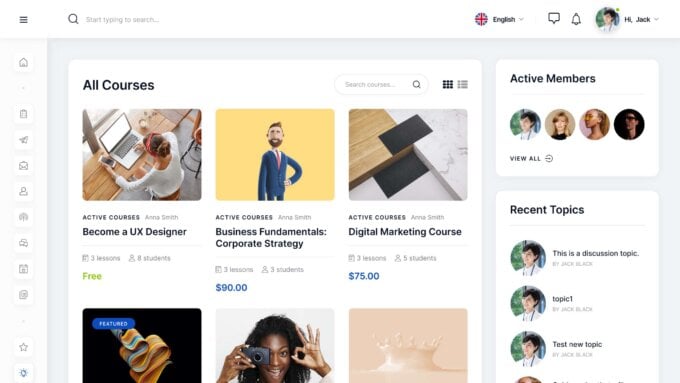
If you’re looking for a WordPress theme that will help you build an online community, Anesta might be the right option for you.
Anesta comes with several demos, including options for eLearning and community sites. Each includes a set of ready-made sections, such as a knowledge base, events calendar, and activity page. Plus, the customization options are extensive, you’ll get a color scheme editor, a header and footer builder, custom fonts, and the Elementor page builder plugin.
Thanks to its integration with LearnDash, this theme enables you to run both free and paid online courses, including features such as quizzes and tests. Additionally, it integrates with the BuddyPress and bbPress plugins, so you can manage an online forum for your students. Members can also share documents and participate in polls.
In summary, Anesta offers all the features you need to run online courses and foster a sense of community.
5. Edumodo

Edumodo has a good set of website demos including one that has been built specifically for use with LearnDash.
When it comes to LearnDash compatibility, Edumodo has lots of support for this eLearning plugin. For starters, there are LearnDash-optimized templates that can be used to promote your courses, present course content in an easy-to-read format, and display other content that’s produced by the LearnDash plugin.
Just as LearnDash integrates with the best membership plugins, so too does the Edumodo theme. Thanks to this, you can easily add a membership component to your education course, giving you the option of putting your courses behind a paywall that only members with an active subscription can access.
Edumodo also comes with the Elementor page builder plugin to help you customize the pre-built content and add extra pages to your website. The premium Slider Revolution plugin is included too, making it possible to create interactive slideshows to promote your courses and share your content.
Other useful features of Edumodo include the social media support for integrating your site with your accounts on the most popular networks, an events management tool to help you promote and hold online learning events from your website, and over 100 theme options that enable you to customize the appearance of your website in many different ways.
Edumodo is a fully-featured LMS WordPress theme with a high level of LearnDash support.
6. Astra
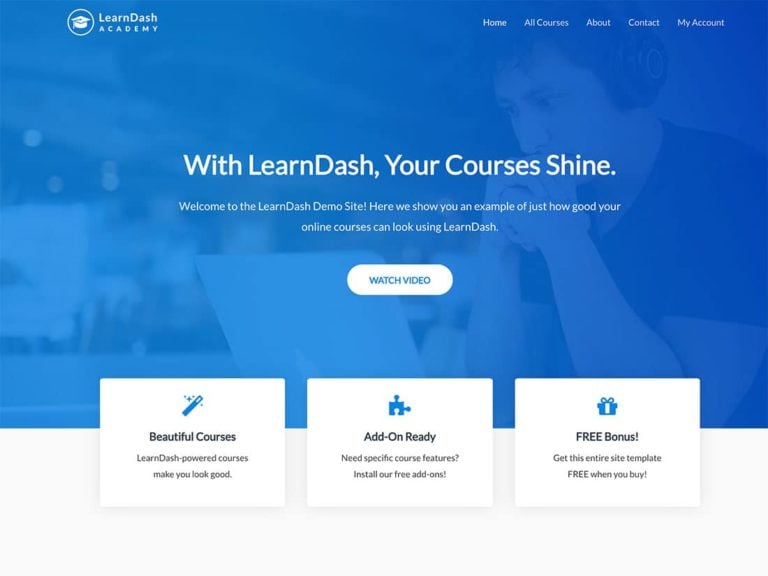
Astra is a WordPress theme that’s recommended by the LearnDash team for use with their LMS plugin.
With the LearnDash demo, you get access to a conversion-optimized homepage layout that will give the front page of your site a stylish and functional design. There’s also a course listings page template that uses the LearnDash grid feature to display your courses in a user-friendly way. The pre-configured account page template is there to help users see their progress and access their content from one central location. There are also a few other templates that will help speed up the process of creating your online learning website.
As this theme has been built to be fully compatible with the Elementor page builder, all of the templates can be edited with this powerful drag-and-drop editor. Thanks to this, you can redesign the templates and create your own custom page design from scratch, all through a user-friendly interface. You can also make site-wide changes to your website such as adjusting the colors and fonts, through the theme options control panel and WordPress Customizer interface.
7. LMSmart

Ideally, you’ll want to use a theme that’s specifically designed for the LMS plugin you’ve chosen. With LMSmart, you’re spoiled for choice.
This theme offers demos built for three popular LMS plugins, including LearnDash. Once you choose a demo, you can customize the header and footer with the Elementor page builder plugin. You can also select a course layout, add a mega menu, and display event listing pages.
LMSmart is packed with eLearning functionality. You can create courses, upload lessons, and design quizzes via a drag-and-drop interface. It also comes with a certificate builder and enables you to hold Zoom meetings with students through your site.
With LMSmart, you’ll get a complete suite of eLearning tools to help you launch your courses.
8. Education Center

Education Center has three homepage layouts to help you publish your LearnDash courses online.
The main feature of the homepage layout is the large slider that can be used to display your most important content to your visitors as soon as they arrive at your website. As your visitors scroll down the default homepage layout, they can see a selection of the main courses, the logos of companies you’ve worked with, or brands you’ve partnered with, and then check out the pricing options that are displayed in the comparison table. You can also use the course calendar widget to share upcoming events, like webinars, course start dates, and more.
Other templates in the Education Center package make it easy to publish your courses online. Thanks to the support for the LearnDash plugin, you can simply publish a course on your website and the Education Center theme will ensure it’s nicely presented and properly formatted. The same applies to the events management support, giving you the ability to display the upcoming events from your schedule in a clearly formatted calendar. If you’re going to be running time-sensitive courses on your website, such as one-day educational events, or using terms and semesters, this feature should come in handy.
To help you customize the pre-built content that makes up the Education Center LearnDash theme, the premium WPBakery Page Builder plugin is included in the package. You can also choose from a selection of header layouts when setting up your site, as well as quickly change the color scheme to suit your branding and preferences. Other customization features, like the menu display tools, a library of fonts, and the shortcode builder will help you personalize your online course website further.
Education Center works well with all the best WordPress plugins including LearnDash, WooCommerce, and more.
9. Edubin

Edubin is an educational WordPress theme that integrates seamlessly with LearnDash.
From building online course platforms and sites for educational institutions to publishing just a single online course and learning content to support your offline tutoring services, Edubin comes with a wealth of templates to help you build the right type of LearnDash-enabled website.
While LearnDash is fully supported by Edubin, this theme has also been built to integrate with other WordPress eLearning plugins, including LearnPress and Tutor. Thanks to this, all of the eLearning and LMS features your project requires will be no more than a few clicks away.
Alongside the professional-looking Edubin homepage templates, there is lots of pre-built content for the other areas of your online course website. This includes responsive grid layouts for displaying your courses, an advanced search page with filters to help your visitors find the courses they’re looking for, and templates for the course content itself. Plus, you can use the supported Elementor page builder plugin to make any necessary adjustments.
If you’re looking for a LearnDash theme that also works with the other popular LMS plugins for WordPress, be sure to check out Edubin.
10. eCademy

eCademy is a WordPress LMS theme that works well with LearnDash.
As well as being compatible with LearnPress and Tutor LMS, eCademy was also built to integrate seamlessly with the powerful LearnDash plugin. Thanks to this, whatever eLearning or LMS features you want to add to your website, you should be able to find the right tool to enable it. eCademy also has a Zoom feature that lets you easily integrate this service with your website to help you deliver learning content online.
eCademy also comes with multiple eLearning-focused demos, making it easy to launch your website. With demos that cover schools, online coaching, and language learning to name just a few, eCademy is a very versatile LMS theme. Elementor is the recommended page builder plugin if you need to edit any of the demo content.
eCademy supports online and offline payments via its compatible plugins.
11. Turitor

Turitor has demos and templates for all types of online learning websites.
If you’re choosing LearnDash for your online learning website, Turitor and its demos could be the theme for you. The demos are suitable for those publishing courses created by a single instructor or multiple instructors and sites for educational institutions offering online courses.
To help enhance your website, Turitor comes with a few useful extra features including a form builder tool, a review plugin, and an addon for the Elementor page builder plugin. The theme is also compatible with BuddyPress, giving you even more options to extend the functionality of your site.
Whether you have one or many online courses, Turitor was built with you in mind.
Does LearnDash come with a theme?
No. LearnDash is a plugin, not a theme, so it does not include a design of its own. You install LearnDash for the course functionality and pair it with a WordPress theme that handles how your site looks. Any of the themes in this list will do that job.
What is the best theme for LearnDash?
It depends on your goal. Sydney and Astra are great lightweight, flexible picks (both free to start), BuddyBoss is the best choice for a learning community with a mobile app, and dedicated education themes like Edubin and Educavo ship ready-made LearnDash demos.
Do I need a special theme to use LearnDash?
No. LearnDash works with almost any well-coded WordPress theme. A LearnDash-ready theme simply saves you time, because it comes with pre-built course, lesson, and account page designs that already match the plugin.
Is Astra good for LearnDash?
Yes. Astra is lightweight, fast, and officially recommended by the LearnDash team, with a dedicated LearnDash starter template. The core theme is free, and Astra Pro (from $69 a year) adds more design control.
Are there free LearnDash themes?
Yes. Sydney and Astra both have free versions on WordPress.org that work well with LearnDash, and you can upgrade to their Pro versions later for extra features and demo imports. The dedicated education themes in this list are premium.
Choosing the best LearnDash theme
If you are not sure where to start, Sydney and Astra are both safe, flexible picks that are free to try and easy to grow with. Choose BuddyBoss if community and a branded mobile app matter most, or one of the dedicated education themes if you want a ready-made course design out of the box.
Whichever theme you pick, install LearnDash first, then import the theme’s LearnDash demo so your course, lesson, and account pages are styled from day one. From there you can customize the design to match your brand.


