If you want a site you can keep changing without asking anyone’s permission, use Elementor. If you want the shortest possible path from nothing to a live site and you can live inside one company’s walls, use Wix. That is the honest one-line answer, and most of the rest is detail.
The detail matters because the two are not really the same kind of product. Elementor is a page builder for WordPress, which is open-source software you host. Wix is a hosted service where the software, the hosting and the editor arrive as one package. Comparing them is really comparing WordPress plus Elementor against Wix.
This comparison walks the same ground you will actually cover: setup, templates, the editors, blogging, SEO, speed, ecommerce and price. At the end there is the part most comparisons skip, which is what a switch between them physically costs you in rebuilt work.
Everything below comes from building on both. Where a claim comes from vendor documentation rather than hands-on use, it says so.
Table of Contents
- Elementor vs Wix: how these two tools work
- How to create your website with Elementor vs Wix
- Available design templates and themes
- Design customization experience for Elementor vs Wix
- Blog writing options for Elementor and Wix
- Extensions and third-party integrations
- SEO options for Elementor and Wix
- Performance optimization with Elementor and Wix
- Ecommerce functionality in Elementor and Wix
- Elementor vs Wix pricing
- What switching between Elementor and Wix actually costs
- Should you use Elementor or Wix?
- FAQs about Elementor vs Wix
- Create your website today
Elementor vs Wix: how these two tools work
Elementor is a plugin that runs on WordPress, which you host yourself or through a managed service. Wix is a closed platform that supplies the software, the hosting and the editor together. Every other difference in this comparison follows from that one.
Don't worry, though, this isn't going to be too complex!
How Elementor works

Elementor is a page builder plugin for the open-source WordPress software. As such, comparing Elementor vs Wix is kind of like comparing WordPress vs Wix.
To use Elementor, you'll first need to have a WordPress site. I'll cover this in more detail in the next section, but you basically have two options to make that WordPress site:
- Use the Elementor Hosting service (sold as Elementor Cloud until the 2025 rename). You sign up through Elementor and it installs and hosts WordPress for you. You can start building right away. This is the most “Wix-like” way to use Elementor.
- Install the WordPress software on your own web hosting. You'll purchase your own web hosting and install WordPress via your host's tool. Then, you can add Elementor to your WordPress site by installing the Elementor plugin.
Once you've set up your site, you can design every element using Elementor's visual interface.
Alternatively, you can also harness the power of WordPress themes. Using a WordPress theme can help you set up the base design of your site (e.g. the header and footer). Then, you can design the rest of your content using Elementor.
Because Elementor is based on WordPress, you can also benefit from the full collection of WordPress plugins which are extensions that add new functionality to your site.
You can find tens of thousands of plugins that add all types of features, from forms to payments, SEO, performance optimization, and more. You can also find third-party plugins that specifically extend the core Elementor plugin.
Overall, this approach of building on top of WordPress has a lot of benefits when it comes to giving you more flexibility for customizing your site.
However, it does add a bit of complexity compared to Wix because there are more “moving parts” to an Elementor site.
How Wix works

Wix is a hosted SaaS (Software as a Service) website builder tool, which has some notable pros and cons to Elementor's open-source WordPress approach.
The main advantage of this SaaS approach is that it simplifies the process of creating and maintaining a website because Wix handles everything for you.
Instead of needing to have your own web hosting, you just register for a Wix account and start building. (However, note that the Elementor Hosting service adds more of a SaaS feel to WordPress and eliminates the need to purchase separate hosting.)
You also don't need to deal with maintaining software and implementing security best practices, everything related to basic maintenance is handled for you when you use a SaaS website builder.
If you're not a very technical person, this simplicity can be a powerful value proposition.
However, the main downside of the SaaS approach is that you have limited flexibility. You only get access to the features that Wix offers, you can't go in and 100% customize things to your needs like you can with an open-source self-hosted tool such as Elementor.
Some users can run into brick walls where they just can't make Wix do what they need, which can be frustrating.
With Elementor, you can pretty much always get around such blocks, though you might need to hire a developer to help you in the rare case that you can't find a plugin for what you need.
Wix has pushed advanced users toward Velo for code and, since 2024, Wix Studio, which replaced Editor X entirely. Both help, but I do not think most casual users get much from them.
How to create your website with Elementor vs Wix
Wix gets you to a live page faster: register, answer a short wizard, start editing. Elementor takes one extra decision, which is where WordPress lives, and after that the two feel similar. Neither route needs code.
In general, Wix has a slightly simpler setup. However, setting up Elementor is also pretty simple, especially if you use Elementor Hosting, so non-technical users shouldn't have problems with either platform.
Elementor website setup
As I mentioned above, Elementor offers multiple ways to create your site. However, the simplest option, and the most comparable to Wix, is to use the Elementor Hosting service (see my review).
With this service, you don't need to worry about purchasing your own web hosting and installing the WordPress software. Instead, Elementor handles setting up everything for you so that you can start building your site right away.
When you sign up, you'll get a simple setup wizard to configure your site's basic details:

You can also choose your starting template (which you can always change later):

Then, Elementor will fully set up and configure WordPress for you.
You can jump straight into the WordPress dashboard, which has a few modifications from Elementor to make it more user-friendly:

To edit your site's design, you'll use Elementor's visual interface (more on that later).
If you opt to use your own hosting, the process is a little more complex, but still well within reach of non-technical users:
- Purchase web hosting and a domain name. You can see our collection of the fastest WordPress hosting for some top options.
- Install the WordPress software. Most hosts offer easy one-click installers.
- Install your WordPress theme. You can either use the Hello Elementor blank canvas theme (if building your site from scratch) or an Elementor-compatible theme such as Sydney.
- Install the free Elementor plugin on your site. You can also add the Elementor Pro plugin to access more features.
- Start building.
Wix website setup
Setting up a website with Wix is super simple, which is one of its main advantages.
To get started, you just register for a Wix account and start building.
You have two options:
- You can use the Wix setup wizard, which guides you through creating your site.
- You can go straight to the Wix templates page and choose a template to start editing.
I'll demonstrate the setup wizard for this example, as it's the easiest way to get started for regular people.
In the setup wizard, you'll choose the basic purpose of your site:

Once you do that, Wix will launch a setup wizard that's tailored to your website's use case, which is quite convenient:

You can then launch the Customize your site interface to control the design.
First, you'll choose a basic font/color scheme:

Wix will then suggest some homepage designs based on your use case and design scheme:

You can then add other pages, such as an About and Contact page.
Then, Wix will launch you into the editor, more on that in a second.
Available design templates and themes
Wix ships more templates in the box, around 800 against Elementor’s own kits. Elementor wins on total choice, because any WordPress theme can add its own starter designs on top, which puts the real number in the thousands.
To help you save time and access professional designs, both Elementor and Wix give you access to hundreds of premade themes.
Overall, Elementor has the advantage when it comes to available design templates. So if you want the most options for choosing a pre-built template, Elementor is the winner.
Elementor itself offers 100+ website kits that you can use as the base of your site. You can browse all of them here.

In comparison, Wix offers 800+ premade templates.
So at first glance, Wix seems like the clear winner.

However, where Elementor excels is that you can find thousands of third-party website designs. Typically, these designs come bundled with WordPress themes that use Elementor.
For example, our free Sydney theme offers dozens of starter sites built with Elementor, check them out here.

Some themes even offer hundreds of Elementor templates. For example, the Jupiter theme has 160+ full website templates, all of which use Elementor.
Having access to these third-party templates gives you thousands of options to choose from, which Wix can't match with its more top-down approach.
There are kind of third-party Wix templates that you can find on marketplaces such as Etsy. However, using them is very awkward, as you typically need to rely on a workaround of sharing your account details with the seller and having them transfer the design to you.
Design customization experience for Elementor vs Wix
Both editors are genuinely good and the choice is mostly taste. The one structural difference worth knowing: Elementor keeps you inside a row and column grid and gives you a tablet breakpoint, while Wix lets you place elements anywhere and gives you a separate mobile editor.
Choosing between them really comes down to personal preference, as both are quite capable.
Personally, I prefer Elementor's interface because it takes fewer clicks to reach the setting I want. However, it's possible that you think Wix does a better job.
Rather than trying to declare a clear winner, I'll just give you a quick overview of how the interfaces work.
Elementor editor
The Elementor editor gives you a visual preview of your design on the right, along with a collapsible sidebar on the left that you can use to add and configure design elements.
You can also interact with the visual design using drag and drop (to move elements around) or right-click (to access key settings):

For example, to add a button to your design, you would drag over the Button widget. Then, you can customize the button's settings in the sidebar:

All of your Elementor designs are responsive by default. But if you want more control, you can activate responsive preview mode and make design changes that only apply to the respective viewport.
For example, you could change the font size for mobile visitors or hide certain elements:

One nice thing is that Elementor also gives you a tablet editing mode and lets you create custom responsive breakpoints, whereas Wix only gives you desktop and smartphone editing modes.
If you want to see it in action, here's a video from the Elementor team that introduces the interface:
Wix editor
The Wix editor gives you a full-width visual preview of your design, along with a number of options to control design elements:

You can add new elements by clicking the plus icon:

You can also select an element and click the Edit button to access its settings in a popup:

To move elements around, you can use drag and drop. Unlike Elementor, which only lets you drag and drop within your preset row/column grid, Wix offers free-form drag and drop that lets you move elements outside the grid.
However, I recommend only doing this in rare situations, as moving elements outside of the Wix gridlines can cause them to not work properly on other devices (e.g. smartphones).
Speaking of responsive design, Wix gives you a separate mobile editor that lets you control the mobile design of your site without affecting the desktop version:

To see it in action, you can check out this official YouTube video from Wix:
Blog writing options for Elementor and Wix
For writing, WordPress is the better tool. Its block editor handles long-form content, structured headings and reusable layouts; the Wix blog editor covers text, images and buttons and stops there. If the blog is the point of the site, that gap is the deciding factor.
However, when you're writing blog content, you'll use a separate text editor.
Elementor blog writing options
I recommend using the default WordPress editor for blog content instead of any Elementor functionality. WordPress offers a block-based editor, which makes it easy to add design elements and basic formatting to your blog posts. To add text, you can just click and type like any other text editor.
If you want to add images, videos, buttons, and other elements, you only need to insert the respective blocks. Similarly, you can use blocks to set up multi-column layouts or make other simple formatting choices.

If you ever feel limited by the WordPress editor, you can also launch the full Elementor interface with the click of a button.
Wix blog writing options
Wix also offers a separate text editor for blog posts. Compared to WordPress, the Wix blog editor is pretty limited, albeit functional for basic blogging.
While it's easy enough to add text, images, and simple elements such as buttons, that's pretty much all you can do.

Overall, the WordPress editor is superior to the Wix editor when it comes to long-form text content, so serious writers and bloggers might prefer to use Elementor and WordPress.
Extensions and third-party integrations
While both Elementor and Wix offer all the core features you need to build a website, you'll probably have situations where you want to extend your site with specific features.
These features could be to handle a unique use case on your site (e.g. appointment booking) or for integrating with a third-party service (e.g. connecting to your customer relationship management tool).
In general, Elementor offers far more flexibility here because you can tap into the full WordPress plugin ecosystem, which offers tens of thousands of plugins.
To see some examples, you can check out our collection of the best WordPress plugins or browse the 68,705 free plugins on WordPress.org, counted 18 September 2026.

Wix does have an App Marketplace to let you extend your Wix site with official and third-party apps.
However, it only offers 250+ apps, which is nowhere near what you get with Elementor and WordPress.

You might be able to add more integrations to Wix with third-party code embeds (e.g. adding a live chat service), but the same is true for WordPress, so Wix doesn't achieve any advantage there.
SEO options for Elementor and Wix
For the SEO work most sites need, titles, descriptions, sitemaps and redirects, the two are close enough that it will not decide anything. Elementor pulls ahead only at the advanced end, because WordPress SEO plugins go further than anything in the Wix app market.
Both tools cover the SEO basics, but WordPress and Elementor give you a little more flexibility when it comes to implementing more advanced SEO strategies because you can use any WordPress SEO plugin.
This lets you access more advanced tools on Elementor, such as internal link suggestions, internal link tracking, keyword tracking, and more.
Here's an example of the basic SEO settings for Elementor when using the Yoast SEO plugin:

And here's an example of the basic SEO settings for Wix:
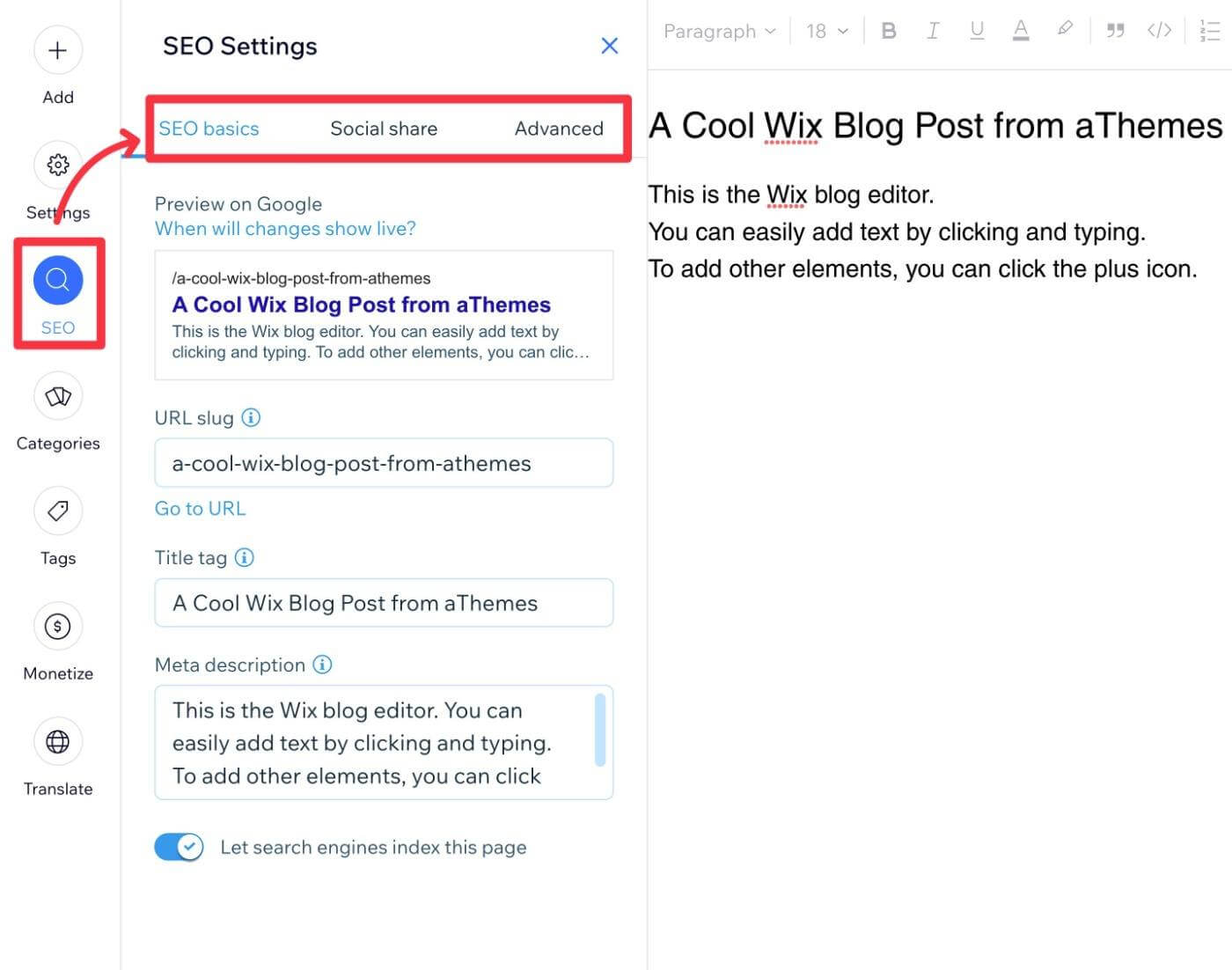
There is a small collection of Wix SEO apps that you can use to add more functionality. However, these apps still can't match WordPress SEO plugins, and some of them can be quite expensive, whereas most Elementor users will be fine with a free SEO plugin.
Still, when it comes to the core SEO features that most people need, you won't notice much difference. It's only in the more advanced features where experienced SEOs might appreciate the flexibility of a site built with Elementor.
Performance optimization with Elementor and Wix
Elementor can be faster than Wix, but only if you do the work: good hosting, a light theme, caching and image optimization. Wix is more consistent because it makes those choices for you. An unoptimized Elementor site will lose to Wix; a tuned one will win.
Overall, while Wix has been working on improving its performance, Elementor and WordPress give you more options for speeding up your site.
If you use these options well, you can create a faster loading site using Elementor (though you might need to purchase your own web hosting to get the best performance, as Elementor Hosting isn't the fastest WordPress hosting service).
However, if you don't implement optimization best practices, your Elementor site could load very slowly.
So you really do need to take advantage of the options that Elementor and WordPress give you if you want your Elementor site to outperform Wix (or hire a developer to do it for you).
Ecommerce functionality in Elementor and Wix
Both Elementor and Wix support creating an eCommerce store.
In general, Wix offers a simpler way to get started with eCommerce. For basic stores, this simplicity can be a huge advantage.
However, Elementor is more flexible when it comes to configuring your eCommerce store, which might make it a better option for more complex stores.
Elementor ecommerce

With Elementor, you can add eCommerce functionality by using WooCommerce or one of the other WordPress eCommerce plugins.
As such, Elementor itself does not have eCommerce functionality, you're relying on a different WordPress plugin.
With that being said, Elementor has deep compatibility with WooCommerce, letting you design every part of your store using Elementor's visual editor thanks to the dedicated Elementor WooCommerce Builder functionality.
To learn more about how WooCommerce works, you can check out our full guide on how to make a WordPress eCommerce store.
Wix ecommerce

With Wix, the eCommerce functionality is built into the core Wix platform via the official Shop app (as long as your billing plan supports it, more on that next).
Because you don't need to rely on a third-party tool, it's a lot simpler to get started with eCommerce on Wix. This can make it appealing if you just want a simple way to sell some products (e.g. a merch store).
You can easily set up products from the Wix dashboard. Then, because Wix is a SaaS tool, it will handle all the important technical details, such as securing your store and processing payments.
Elementor vs Wix pricing
The two price in different shapes, which is why a straight number comparison misleads. Wix charges one subscription that covers software and hosting together. Elementor charges for the builder, and hosting is either bundled through Elementor Hosting or bought separately from any WordPress host.
Wix sells Light, Core, Business and Business Elite, in that order, and ecommerce starts at the Business tier. Elementor sells a free plugin plus Pro at Essential, Advanced, Expert and Agency, and Elementor Hosting as the managed option that includes the site.
We are not quoting figures here. Both companies render prices client-side and run region and promotional pricing, so anything printed on this page would be wrong for somebody the day they read it. Open both pricing pages and compare the tiers you actually need.
The variable worth planning for is what happens after year one. A Wix plan renews at a predictable rate. An Elementor site costs the builder licence plus hosting, and those renew separately, so the second year is where the two diverge more than the first.
Pricing for Elementor and Wix extensions
Beyond the core software, the other cost is what you add. Both have free and paid extensions, but the pricing culture differs: most WordPress plugins sell a licence with optional renewal for updates, while Wix apps mostly run as ongoing subscriptions. Over several years that difference compounds in WordPress’s favour.
What switching between Elementor and Wix actually costs
Most comparisons stop at features, which is fine if you are starting from nothing. If you already have a site, the more useful question is what a move would cost you, because the answer is not symmetrical and it is not small.
There is no export from Wix that produces a working WordPress site. Wix gives you an RSS feed of blog posts and nothing else, so everything that is not a blog post is rebuilt by hand. Going the other way is easier, because WordPress exports everything, but Wix has no importer that reassembles it.
| What you are moving | Wix to WordPress + Elementor | Elementor to Wix |
|---|---|---|
| Blog posts | Transfers via the RSS feed, usually with formatting to clean up | Exports cleanly from WordPress, no Wix importer to receive it |
| Pages and layouts | Rebuilt by hand, every one | Rebuilt by hand, every one |
| Images and media | Downloaded and re-uploaded, alt text re-entered | Downloaded and re-uploaded |
| URL structure | Wix uses fixed prefixes such as /post/, so redirects are mandatory | Your structure changes to Wix’s, so redirects are mandatory |
| Titles, descriptions, redirects | Re-entered in an SEO plugin | Re-entered in the Wix SEO panel |
| Forms and submissions | Forms rebuilt, past entries stay behind in Wix | Forms rebuilt, entries exportable first |
| Products and orders | Products via CSV, order history does not come | Products via CSV, order history does not come |
| Apps and plugins | Every one replaced with a WordPress equivalent | Every one replaced with a Wix app, where one exists |
| Email and domain | Domain transfers, Wix-hosted mailboxes do not | Domain transfers |
Read the table as a warning about direction of travel. The lock-in is real on the Wix side and mostly practical on the WordPress side: nothing stops you leaving WordPress, but nothing on the Wix end is waiting to receive it either.
The practical conclusion is that this choice is stickier than it looks. Pick for where the site needs to be in three years, not for which editor felt nicer in an afternoon.
Should you use Elementor or Wix?
Overall, this comparison is really between Wix and “Elementor + WordPress”.
While Elementor is an incredibly powerful design tool by itself, it's impossible to isolate it from its WordPress foundation, and that's generally a good thing because WordPress offers a lot of additional benefits that go beyond Elementor.
For that reason, I think that Elementor makes a better option for most people.
Elementor offers the visual, code-free design experience that attracts so many people to Wix, while the WordPress foundation gives you access to the full flexibility of WordPress (if you want it).
Additionally, thanks to the new Elementor Hosting service, Elementor is able to offer a setup/maintenance process that's almost as simple as using Wix.
If you feel overwhelmed by the idea of setting up WordPress yourself, I recommend using Elementor Hosting as it makes everything very simple.
On the other hand, Wix can be a good option if you want the absolute simplest way to make a website and you're ok with sacrificing flexibility to achieve that simplicity. But for most people, Elementor strikes a better balance between simplicity and flexibility.
FAQs about Elementor vs Wix
Is Elementor better than Wix?
For most sites that need to grow or change, yes, because WordPress gives you options Wix cannot. For somebody who wants one simple site live this week and never wants to think about maintenance, Wix is the better answer.
Can I move my Wix site to WordPress?
Partly. Blog posts transfer through the RSS feed. Pages, layouts, forms and products are rebuilt by hand, and you will need redirects because Wix URLs use fixed prefixes. Budget it as a rebuild, not a migration.
Is Elementor free?
The Elementor plugin is free and enough to build a real site. Elementor Pro adds the theme builder, popups, form widgets and the WooCommerce widgets. Elementor Hosting is a separate paid product that includes the hosting.
Which is faster, Elementor or Wix?
It depends on you. A tuned Elementor site on good hosting with a light theme beats Wix. An untuned one loses to it, because Wix makes the performance decisions for you and you cannot make them worse.
Do I need to know how to code for either one?
No. Both are visual drag-and-drop editors and a complete site can be built in either without writing code. Code only becomes relevant when you want something neither tool offers, and there WordPress gives you somewhere to go.
Create your website today
That wraps up our thoughts on Wix vs Elementor for making a website.
Both tools can help you get the job done, it's really just about choosing the right one for your needs.
To see how Wix compares to another popular design tool, you can read our detailed Wix vs Webflow comparison. Or, we also have a post with the top Elementor alternatives if you want to see even more options.
Do you still have any questions about choosing between Elementor vs Wix? Let us know in the comments!


