Elementor Pro is worth it if Elementor is the main design tool for your site, and skippable if you only touch a few landing pages a year. That is the short version; the honest answer depends on which paid features you would actually use.
The decision is tricky because the free version of Elementor is already quite capable. A lot of sites might be totally fine with using just the free version, especially if you only want to use Elementor to design certain pages.
However, Elementor Pro also has a lot of advantages, especially if you want to use Elementor to design your entire site.
You get more widgets, more templates, and more settings. Plus, you get access to full theme building support (even for WooCommerce stores) and a popup builder.
But will you get enough value from those enhancements to justify the price of Elementor Pro?
In this post, we'll dig into Elementor free vs Pro to help you decide if Elementor Pro is worth it for your specific situation.
Table of Contents
The short answer
Yes, Elementor Pro is worth it if you want complete design control over your site, custom headers and footers, or store and form layouts you can build visually. The free version is enough for a basic landing page or blog. The core difference in one line: free Elementor is a page-level builder, while Pro turns it into a complete site builder. Pricing starts at $60/year for one site.
If you're only using Elementor to design a few landing pages, or you're comfortable filling feature gaps with free third-party plugins, the free version is genuinely capable on its own.
Below we break down exactly what Pro adds, when each upgrade scenario makes sense, and how to pick the right license tier. We also measured what the free version actually weighs, straight from the official packages, because none of the sources ranking for this question publish real numbers.
Elementor free vs Pro: the decision matrix
Find your situation in the left column; the right column is the honest verdict:
| Your situation | Free or Pro? | The deciding feature |
|---|---|---|
| A few landing pages on an existing theme | Free | The free builder and widgets cover this fully |
| A blog or brochure site whose theme already handles headers and templates | Free | You never touch what Pro adds |
| A simple static site on a tight budget | Free | No time limit and no forced branding on the free tier |
| Designing the whole site in Elementor | Pro | Theme Builder (headers, footers, post templates) |
| You want complete design control, down to custom headers and footers | Pro | Theme Builder |
| A WooCommerce store with custom product and cart pages | Pro | WooCommerce Builder |
| Lead generation: forms, popups, email integrations | Pro | Form widget + Popup Builder |
| Client sites at volume | Pro (Expert tier) | 25-site license + website kits |
| Custom-field content site (ACF, Pods, Meta Box) | Pro | Dynamic content |
| Happy to fill gaps with free third-party plugins | Free | Separate form and popup plugins close most of the gap |
Summarizing Elementor free vs Pro feature differences
I want to start things off by comparing the features in Elementor free vs Pro.
While you can find all of this information on the Elementor website, I think it's useful to summarize it here because you can't decide if Elementor Pro is worth it without knowing what it offers.
Here's the side-by-side at a glance:
| Feature | Elementor Free | Elementor Pro |
|---|---|---|
| Price | Free forever | From $60/year |
| Number of widgets | 32 core (counted from the 4.2.2 package), plus newer module widgets | Adds many more, including Form, Posts, and WooCommerce widgets |
| Templates and website kits | 100+ basic | A far larger library, including Pro-only website kits |
| Theme Builder (custom headers/footers) | No | Yes |
| Form Builder | No | Yes |
| Popup Builder | No | Yes |
| WooCommerce Builder + widgets | No | Yes |
| Dynamic content (custom fields, ACF) | No | Yes |
| Marketing integrations (Mailchimp, HubSpot, etc.) | No | Yes |
| Custom CSS in editor | Section/column level | Section, column, and widget level |
| Premium support | Community forum only | Priority email/chat |
| Sites covered per license | Unlimited (free) | 1, 3, or 25 (by tier) |
| Best for | Landing pages, simple sites | Full sites, stores, agencies |
We'll dig into each row below, starting with what you get for free.
Elementor free features
The free version of Elementor already gets you access to the full Elementor interface. That includes:
- The full visual, drag-and-drop builder, including right-click support, Navigator, Finder, and so on
- All the responsive design options, including responsive editing mode
- A solid selection of widgets
- Most of the design options, including all of the core controls that most people need
- Global site controls for colors and typography
When it comes to the basic design experience, there's really not any difference between Elementor free vs Pro.
The main difference is that Elementor Pro builds on that foundation to give you “more” in a lot of areas.
Elementor Pro features
Here are some of the biggest features that you get with Elementor Pro:
More widgets (including a Form Builder)
Elementor Pro adds a bunch of new widgets that you can use in your designs.
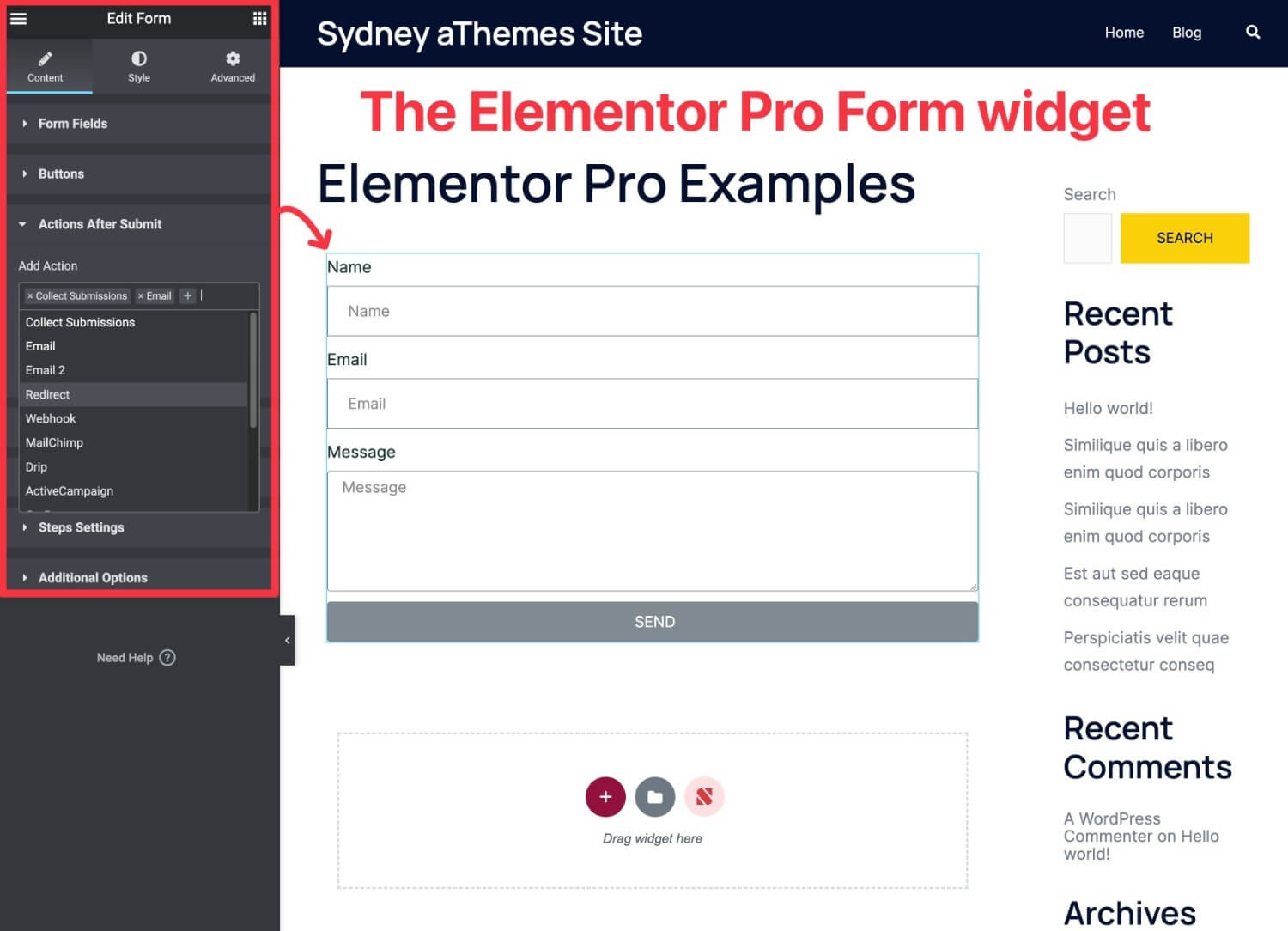
The most notable addition is the Form widget, which can replace the need for a separate form plugin in a lot of cases. You can use it for basic contact forms, but it also includes email marketing and CRM (customer relationship management) integrations so that you can use it for lead generation:
Beyond that, here are some of the other useful widgets that you get access to:
- Slides: create sliders and replace separate slider plugins
- Posts lists
- Price table: replace separate pricing table plugins
- Price list
- Countdown timer
- Login form
- Testimonial carousel
- Call to action
- Social share buttons: replace separate social share plugins
- Facebook like buttons
- Animated headline
More design options
While the free version of Elementor already gives you a good amount of design control, Elementor Pro ups the ante with even more design options.
Here are some of the most notable new design features in Elementor Pro:
- Add custom CSS to individual elements – While the free version lets you add CSS selectors to elements, Elementor Pro lets you add custom CSS directly to individual widgets, columns, and sections.
- Motion Effects (scroll effects) – Add unique scroll effects to your designs.
- Custom fonts – Easily add and use custom fonts in your designs.
To see some examples of what you can do with these features, check out Elementor's Motion Effects introduction blog post.
More templates and website kits
While the free version of Elementor gives you a basic collection of page templates, Elementor Pro offers a lot more selection.
You get more individual page templates, but Elementor Pro also offers 100+ website kits, which are collections of templates to help you create a full website:

Because they cover lots of different niches, these can be especially helpful if you're building client sites. You can import the website kit and then customize it to meet your client's needs, which can save you a lot of time.
Theme Builder
One of the biggest new features in Elementor Pro is full theme building support.
With theme building, you can go beyond designing individual posts or pages and actually customize your theme template files using Elementor.
For example, in addition to designing a single blog post (included in Elementor free), you could design the template that some or all of your blog posts automatically use. To help you do this, you get special widgets to dynamically insert information such as a post's title, content, featured image, and so on.
You also get conditional rules to control when to use each template. For example, you could create a special template that only applies to posts in the “Reviews” category.
You can use the theme builder to design the following templates:
- Header
- Footer
- Single post (e.g. an individual blog post, page, custom post type, etc.)
- Archives (the pages that list multiple pieces of content, e.g. your blog listing page or author archives)
- 404 page

Elementor Pro even added a new Loop Builder feature in Elementor Pro 3.8 (released in November 2022), which lets you customize the design of repeating items.
You could use these features to completely replace your theme (in which case you'd use Elementor's blank canvas Hello theme).
Or, you could use them to just surgically replace certain parts of your theme, such as designing a custom header. In this case, you could use a lightweight base theme such as Sydney.
WooCommerce Builder (and WooCommerce widgets)
If you're building a WooCommerce store, Elementor Pro also offers a WooCommerce builder, which is basically the theme builder features from above, but for WooCommerce stores.
You can use Elementor's interface to fully customize your single product pages, as well as your shop listing pages.
Beyond that, Elementor also recently added dedicated widgets for the Cart, Checkout, and My Account pages, which let you fully customize those key elements using Elementor's interface.
For example, beyond controlling the layout, you get detailed style options for every single element in your cart:

Popup Builder
With Elementor Pro, you can use the regular Elementor interface to design custom popups that you can display anywhere on your site. In fact, this feature is powerful enough that it can completely replace the need for a dedicated popup plugin.
You can fully customize the popup canvas, which lets you create all different kinds of popups, including the following:
- Modal popups (“regular” popups)
- Notification bars
- Slide-ins
- Full-screen fillers
- Etc.
You also get detailed targeting and trigger rules, including all of the classic triggers such as time on site, scroll depth, and exit intent:

When combined with the Pro widgets (such as the Form widget), this can handle a ton of different use cases for popups, such as:
- Announcements/promotions
- Email list building
- Contact forms
- Login/registration forms
- Social share prompts
- Age gates
- …lots, lots more
Dynamic content support
This is a more advanced feature, but one that's really useful if you're building custom content sites.
With Elementor Pro's dynamic content feature, you can populate the content of a widget with data that you pull dynamically from your WordPress site.
You can pull information from core WordPress data, e.g. the name of a logged-in user. Or, you can pull data from custom fields that you've added with plugins such as Advanced Custom Fields (ACF), Pods, Toolset, or Meta Box.
For example, in this image below, I've dynamically populated my name (“Colin”) by pulling it from the WordPress database. If a different user were to visit this same design, it would show their name instead:

Overall, Elementor Pro offers one of the easiest ways to work with custom content and custom fields without needing any code.
Is Elementor free? What you get without paying
Yes, Elementor has a fully functional free version available in the official WordPress plugin directory, and it's more capable than most free page builders. There's no time limit, no feature lock that demands an upgrade after X days, and no forced branding on your site.
Here's what you can actually do with the free version:
- Drag-and-drop edit any page or post on your site
- Use 32 core widgets (we counted the widget classes in the official 4.2.2 package) covering text, images, video, buttons, icon boxes, image carousels, testimonials, social icons, and more, plus newer module widgets such as nested tabs and text path
- Build responsive layouts with desktop, tablet, and mobile breakpoints
- Save and reuse designs as templates
- Access 100+ free templates from Elementor's library
- Add custom CSS at the section and column level (Pro extends this to widgets)
What the free version weighs (measured)
Page builder reviews love to argue about bloat, so here are numbers instead of adjectives. We downloaded the official WordPress.org packages in August 2026 (Elementor 4.2.2 and the Hello Elementor theme 3.4.9) and measured what actually ships.
- Core front-end payload: the CSS and JavaScript bundles Elementor loads on a rendered page total about 140 KB raw, roughly 35 KB compressed (frontend.min.css at 53 KB, frontend.min.js at 31 KB, frontend-modules.min.js at 49 KB, plus a small runtime).
- Conditional extras load only when used: the lightbox (11 KB) and dialog (16 KB) styles stay off the page until a design needs them.
- On disk, it is a big plugin: the package unzips to about 86 MB across 3,626 files. That affects your server footprint, not your visitors' load times.
- Hello Elementor adds almost nothing: the blank-canvas theme's base stylesheet is about 1 KB, which is exactly why it is the standard pairing for full-Elementor builds.
We did not measure Elementor Pro (these numbers come from the packages anyone can download, and Pro requires a license). Directionally, Pro layers additional widget assets on top of the same core, and how much a page actually loads depends on which Pro features that page uses.
When the free version is genuinely enough
The free version covers most needs if you're:
- Building a personal blog or simple business site where the page layout doesn't change much
- Designing one or two landing pages on top of an existing WordPress theme
- Using a theme that already handles your headers, footers, and post templates well
- Comfortable installing free third-party plugins to fill in gaps (forms, popups, and so on)
Where the free version starts to bite
You'll feel the limits when you want to:
- Customize your site's header, footer, archive pages, or single-post template visually (that's the Theme Builder, Pro-only)
- Add a contact form without installing a separate plugin
- Run popups, slide-ins, or exit-intent campaigns
- Build a styled WooCommerce store with custom product pages and cart designs
- Pull dynamic content from custom fields (ACF, Pods, Toolset)
- Connect forms directly to email marketing tools (Mailchimp, HubSpot, ConvertKit) without extra integrations
Is Elementor Pro necessary if you already use Elementor?
No, Elementor Pro is not necessary to use Elementor. The free version is fully functional on its own and can build complete WordPress sites. Pro is an upgrade that adds the Theme Builder, Form Builder, Popup Builder, WooCommerce widgets, and a much larger widget set. Those features become important only when you're designing the entire site (not just specific pages) inside Elementor.
When is Elementor Pro worth it?
Now, let's talk about some of the situations when it's worth it to pay for Elementor Pro.
You want to design your entire site with Elementor
If you want to go beyond designing individual pages and customize your entire site with Elementor, you should upgrade to Elementor Pro for the Theme Builder feature alone.
With Theme Builder, you'll be able to customize all of your theme templates at will, which gives you full control over every single part of your site.
Plus, you still get all those new widgets and design options, which gives you even more flexibility for setting up your site.
You're building a WooCommerce store
If you want to use Elementor to help you create a WooCommerce store, upgrading to Elementor Pro is definitely worth the money.
First off, you get the WooCommerce Builder feature, which is reason enough to upgrade by itself. With this, you can customize every single part of your WooCommerce store using Elementor, even down to the cart and checkout pages.
Beyond that, you get a lot of new WooCommerce widgets that you can use in other parts of your design.
Elementor Pro also has many other features that are handy for WooCommerce stores. For example, you can use the Popup Builder to promote sales and grow your store's email list.
If you're using this approach, you can consider using a lightweight WooCommerce theme such as Sydney as your base.
That way, you only need to use Elementor Pro to tweak things, rather than building your entire store from scratch. This will also help your store load faster because Sydney is one of the fastest WooCommerce themes.
You're using Elementor for marketing purposes
If you're using Elementor for marketing purposes, e.g. creating landing pages, growing your email list, etc., then I think Elementor Pro definitely offers value for you.
Here are some of the Elementor Pro features that will help you market more effectively:
- Popup Builder: You can promote offers, generate leads, and so on.
- Form widget: You can create forms for lead generation (including direct integrations with popular marketing tools or a catch-all Zapier integration).
- Countdown widget: You can add urgency to your marketing content with countdown timers.
- More landing page templates: You get a larger, more diverse collection of pre-built landing page templates.
You're building client websites
If you're a freelancer or agency building websites for clients, you should absolutely upgrade to Elementor Pro because it can greatly speed up your workflows, which will more than pay for the licensing cost.
Plus, you get access to a lot more templates and website kits, which can be really handy when you're building client sites in different niches.
You're building a custom content site (e.g. custom fields)
If you're building a custom content site that uses custom fields to store additional data, Elementor Pro is absolutely worth it for the dynamic content feature alone.
With this feature, you can easily incorporate all of your custom data into your designs without needing to write a single line of code.
So if you want a visual way to work with custom data from plugins such as Advanced Custom Fields (ACF), Toolset, Pods, or Meta Box, I definitely recommend upgrading to Elementor Pro.
Which Elementor Pro license should you choose?
Elementor sells Pro in two formats: the standalone Pro plugin (you bring your own WordPress hosting) and Elementor One, an all-in-one bundle introduced in 2025 that combines Pro with monthly AI credits, hosting features, and integrated email tools.
Elementor Pro plugin (standalone)
| Tier | Price/year | Sites | Best for |
|---|---|---|---|
| Essential | $60 | 1 | One basic personal or business site |
| Advanced Solo | $84 | 1 | Power users on a single site (full Pro widget set) |
| Advanced | $108 | 3 | Side projects plus a main site |
| Expert | $204 | 25 | Freelancers and small agencies |
All standalone plans are billed annually and include a 30-day money-back guarantee.
Elementor One (bundle)
Elementor One pairs the Pro plugin with monthly One credits (used for AI content generation, image optimization, accessibility tools, and email features). It's positioned as the all-in-one option for people who don't want to manage separate tools.
| Plan | Price/year | Sites | One credits/month |
|---|---|---|---|
| One | $228 | 1 | 25,000 |
| One Agency | $540 | Unlimited | 350,000 |
How to pick
- Just one site, simple setup: Essential ($60/year)
- One site, want every Pro widget: Advanced Solo ($84/year)
- Two or three sites: Advanced ($108/year, cheaper than buying multiple Essential licenses)
- Freelancer or small agency with up to 25 client sites: Expert ($204/year)
- Want hosting, AI, and email features bundled: Elementor One ($228/year for 1 site)
- Larger agency, unlimited sites: One Agency ($540/year)
FAQs about Elementor Pro
Is Elementor actually free?
Yes. Elementor’s free version is available in the official WordPress plugin directory and includes 32 core widgets (we counted them in the official 4.2.2 package), the drag-and-drop editor, responsive controls, and 100+ templates. It’s free forever, with no time limit and no feature lock that demands an upgrade later.
How much does Elementor Pro cost?
Elementor Pro starts at $60/year for the Essential tier (1 site). Standalone plugin pricing scales up to $204/year for Expert (25 sites). The Elementor One bundle is $228/year for 1 site, and One Agency is $540/year for unlimited sites. All annual plans include a 30-day money-back guarantee.
Is Elementor Pro a one-time purchase or a subscription?
Elementor Pro is sold as a yearly subscription. There’s no one-time-purchase option. Elementor One offers monthly billing in addition to annual.
What happens if I stop paying for Elementor Pro?
Your existing Pro designs stay live. The Pro widgets and Theme Builder layouts you’ve already built keep working. What you lose: plugin updates, security patches, premium templates, and support. Most people renew at least every other year for the security updates alone.
What are the cons of using Elementor Pro?
An honest list. Stacking too many widgets per page can slow load times. The editor has a learning curve compared to the WordPress block editor. Switching away from Elementor later means rebuilding pages because the layouts are tied to the plugin. And pricing has steadily increased over the years.
What’s better than Elementor Pro?
It depends on what you’re building. Bricks Builder is faster and cleaner for developers who don’t mind a steeper learning curve. Divi gives you a one-time-purchase option, which is unusual in this category. The native WordPress block editor covers most needs for content-focused sites that don’t need heavy design customization. Elementor Pro stays the most popular pick because the ecosystem, templates, and learning resources are larger than any alternative.
So, is Elementor Pro worth it?
Short answer: yes for most people who use Elementor as their main design tool, no if you only edit a few pages a year.
Get Elementor Pro if any of these are true:
- You're designing a full site (not just landing pages) inside Elementor
- You need a contact form, popup, or WooCommerce-styled store
- You're building client sites for money
- You want one tool that handles forms, popups, theme building, and dynamic content without stacking five different free plugins
Skip Pro and stick with the free version if:
- You only design a handful of landing pages a year
- Your existing WordPress theme already covers headers, footers, and templates well
- You're fine using free third-party plugins (Contact Form 7, popup plugins, and so on) for the gaps
If you fall in the “yes” group, the cheapest tier that fits your site count is enough to start. You can always upgrade later. Elementor lets you change tiers without losing your designs.

Related Posts


