Summary
GeoDirectory is a free plugin for creating directory and listings websites with WordPress. The core plugin can be enhanced by installing the free and paid add-ons, and there are also free and paid WordPress themes available for your directory website.
GeoDirectory is a free plugin for creating directory and listings websites with WordPress. The core plugin can be enhanced by installing the free and paid add-ons, and there are also free and paid WordPress themes available for your directory website.
Pros
Free core plugin
Lots of useful free and paid add-ons
Powerful set of features
Good selection of compatible themes
Highly flexible
Cons
Some might prefer an all-in-one directory theme and plugin combination
Cost of paid add-ons could get expensive, depending on your needs
Some of the themes don’t look very modern
Quick verdict
GeoDirectory is the strongest free foundation for a WordPress directory site, and the best pick when you expect the directory to grow. It stores listings in its own custom database tables instead of post meta, which is why it stays fast at a scale where most listing plugins slow down.
The core plugin is genuinely free on WordPress.org, currently on version 2.8.172 with over 10,000 active installs and a 4.8 out of 5 rating from 715 reviews. Expect to add at least one or two paid add-ons for a real project. All official add-ons and themes come bundled in a $229 per year membership with a 30 day money-back guarantee.
Choose GeoDirectory if you want to keep your existing theme and build a directory that can scale. Choose an all-in-one directory theme instead if you want the design and the directory handled together in one purchase.
GeoDirectory is a free plugin that was created to enable WordPress users to build a fully-featured directory listings website, no matter what theme they’re using.
Once enabled on your site, the free version of GeoDirectory should provide you with enough features to get started. However, if there are any features missing from the core plugin, the library of free and premium add-ons for GeoDirectory should be able to add the necessary functionality to your directory.
As mentioned, GeoDirectory should work with any good WordPress theme. However, if you haven’t chosen a theme for your website yet, there are a number of free and paid options from the GeoDirectory team that were built specifically for use with this plugin.
This also means that if you’re building a directory website with WordPress, you don’t have to choose a directory app theme to get access to all the premium directory features required to build a professional site of this type.
You can get started for free (provided you have hosting and a domain for your website), and then pay to add any extra features as and when needed.
But, is this the right tool for your website?
In this GeoDirectory review, we take a look at the features of the core plugin, as well as the add-ons that are currently available for it. We also explore how easy it is to use, from both the admin and end-user perspectives.
GeoDirectory features

To give you an idea if this is the right plugin for your project, here’s a look at the main features of GeoDirectory.
Some of these features are available in the free version of GeoDirectory, while others are available as paid add-ons. We cover the pricing details later on in this review, however, you can purchase all of the add-ons for one reduced price as part of the membership program, rather than buying them individually.
Now let’s see what you can do with GeoDirectory and its add-ons.
Support for single and multiple locations
Whether you want to create an online directory or listings website for a single location or extend it to cover multiple locations, GeoDirectory would work for your project.
The free version of GeoDirectory does only support a single location, while a premium add-on unlocks multiple location support and the ability to create a global directory. You can also integrate GeoDirectory with the WPML plugin to create a multilingual directory and publish your website and its listing on more than one language.
As this is a versatile plugin, you can also use it to create online listings and directories that aren’t linked to a physical location at all. Therefore, if you’d like to create a directory where freelancers, for example, can sign up and advertise their services, GeoDirectory would work for that too.
However, as this plugin has so many useful location-based features, it really excels when it comes to creating local business directories and similar types of projects.
Smart location switching
If you do install the Location Manager add-on and enable multiple location support for your directory, you can use the smart location switching feature to ensure that your visitors see the listings that are most relevant to them.

After detecting the location of the website visitor, the plugin will suggest which locations from your directory they should view. If the location of the visitor doesn’t match a location in your directory, the plugin will show the listings that are closest to the visitor.
If a visitor is using a smartphone to access your site, their GPS signal can be used to provide even more accurate local listings. Thanks to this, you can use “near me” filtering to keep your listing results as relevant as possible for your smartphone users. By simply clicking on the “near me” button that you can display on your website, the local listings are displayed to the user. If the GPS data isn’t available, the user can instead drag a pin on the map to the location they’re most interested in.
While location detection is useful in some scenarios, you don’t have to rely on it for your directory. Once the Location Manager add-on has been installed, you can quickly add a location switch to your website. After doing this, your visitors can easily change the location settings of your directory to view the listing they’re most interested in.
Google Maps integration

To ensure that your audience finds your listings useful, you can easily integrate this plugin with Google Maps. Doing so adds the interactive maps from Google to your website and listings.
This then gives your visitors more information and an easier way to find the businesses or other entities included in your directory.
There’s a premium add-on available that gives you lots of control over how the Google Maps on your website look and function. However, even without this add-on, you can still integrate your listings with Google Maps.
Editable frontend submission forms
To make it as easy as possible for you, your team, and your visitors to add new listings to the directory, GeoDirectory comes with its own set of editable front-end submission forms.
Not only do these forms integrate seamlessly with your WordPress theme but they can also be easily customized. Thanks to the editability of these forms, you can ensure that they contain the fields you need so that you can capture the data you require for each listing submission. While GeoDirectory comes with a good selection of form fields, you can also create custom fields to capture more information through your forms.
The form builder uses a drag-and-drop interface to keep the customization process as straightforward as possible.
If you install the premium Advanced Search add-on, you can ensure that your visitors are able to search the data stored in the custom fields that have been added to your listings and submitted via your forms.
Paid listings support
If you want to monetize your online directory by charging your visitors to add their listings to your site, you can do so with the premium Pricing Manager add-on.
Unfortunately, this monetization functionality isn’t available in the free version of GeoDirectory. However, by either purchasing the relevant add-on individually or signing up for the membership option that gives you access to all add-ons, you can add this functionality to your online directory.
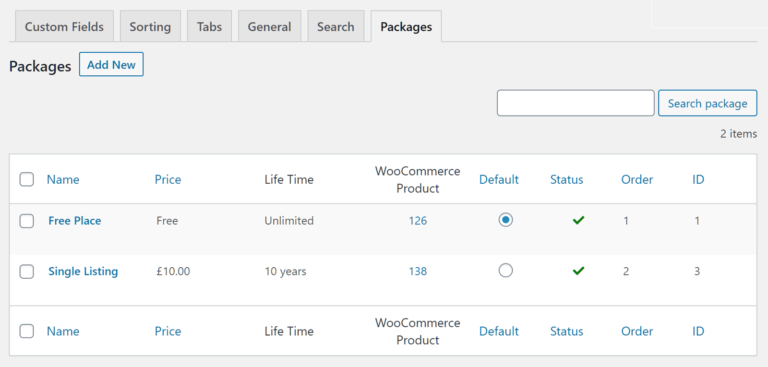
If you do install the Pricing Manager add-on, you can monetize your directory in a range of different ways. Some examples include creating free trials that let your visitors access your premium features for a set amount of time without paying any money, then having the option of signing up, setting up recurring payment plans to collect fees at pre-agreed intervals, and creating as many pricing packages as you want, each with their own settings and conditions.
As the Pricing Manager add-on integrates with WooCommerce and WP Invoicing, you can automatically generate invoices for your paying users.
From charging a one-time fee for allowing a user to publish a listing on your directory, to creating recurring payment plans that provide access to your directory, and a whole range of other options, the Pricing Manager add-on should provide you with everything you need to monetize your online directory.
Create listings for business owners to claim
Creating listings yourself for the businesses you’d like to be using your website is one way to kickstart your directory. You can then make those listings claimable so that the owners of the companies featured in the listing can take charge of it and add extra information.
The premium Claim Listings add-on makes it possible for you to create a listing for a local gym, for example, then allow the owner of that gym to sign up and start managing that listing. The benefit of them claiming the listing is that they can add more useful content to it in order to help it appeal to their target audience.
You can also use this add-on to add a verified badge to claimed listings to give them a more official look. You can also enable email notifications to keep everyone in the loop when a listings claim application has been started.
The Claim Listings add-on includes a button on the listings that can be claimed. It also integrates with the Paid Listings add-on mentioned earlier in this GeoDirectory review. Thanks to this, you can charge users a fee to take control of their listing.
Event management
While the core GeoDirectory plugin is ideal for publishing a wide range of listings, including details of businesses, attractions, or other places of interest, you can also use it to publish the details of events. The Events add-on used to be a premium purchase. It is now free on WordPress.org, so you can build an events promotion site without paying for the add-on at all.
This add-on is packed with features, including the ability to create recurring events, a calendar view that makes it easy for visitors to see upcoming events, and advanced filtering to help users find more of the events they’re interested in. Thanks to this, it should have everything you need to create an events listings website with WordPress.
BuddyPress integration
If you want to give your directory more of a community feel, then you can add a lot of interactive features to your website with the premium BuddyPress Integration add-on.
As BuddyPress is a social networking plugin for WordPress, you can use this add-on to integrate the interactive features of BuddyPress with GeoDirectory. Doing so makes it easy to add discussion areas to your listings as well as enabling your users to create enhanced public profiles.
If you want to make your directory more engaging and a place that your users want to keep coming back to, enabling social networking features via the BuddyPress integration can really help. However, you will have to pay to install this add-on.
The above are just some of the useful official add-ons available for GeoDirectory. You can view the full list on the plugin website.
WordPress themes

Another notable feature of the GeoDirectory plugin is that it should work with any WordPress theme.
So if you already have a website set up and are using a reputable WordPress theme, you should be able to start using this plugin without any problems.
However, if you’ve yet to choose a theme, the GeoDirectory team has a few of their own that were built specifically for use with their plugin. If you’re already using the Genesis framework or intend to do so, there are a few Genesis child themes, such as Geo Bold and Geo Travel, in the GeoDirectory theme library too.
There are free and paid options among their theme collection, and while you can purchase the premium themes individually, you do get access to all of them, and all of the official add-ons, if you sign up to one of the GeoDirectory membership plans (more on those later).
How GeoDirectory handles scale
One structural detail separates GeoDirectory from most listing plugins: it stores listing data in its own custom database tables rather than in WordPress post meta. That sounds like an implementation detail, but it is the reason the plugin holds up on large directories where post-meta-based plugins start to crawl. The developers position it for everything from a small local portal to an enterprise-scale directory or classifieds site.
GeoDirectory is built by AyeCode, who also make two sister plugins that slot into the same stack: UsersWP for user profiles and membership, and GetPaid for payments and invoicing. If you plan to run a paid directory with user accounts, it is worth knowing those exist before you assemble a stack out of unrelated plugins.
GeoDirectory user experience
So far, our GeoDirectory review has given you an overview of the features of this plugin and what it can do. Now, let’s explore what it’s like to use GeoDirectory from both a website owner and an end-user perspective.
GeoDirectory admin user experience
If you’re a website owner, the good news is that GeoDirectory is pretty easy to use. As the core features of GeoDirectory are available via the free plugin, it can be installed directly from inside your WordPress dashboard by searching the WordPress.org plugin directory.
Once installed and activated, a new menu item is added from where the GeoDirectory control panel can be accessed. If you do purchase any of the add-ons or sign up for one of the membership plans, you can enter your activation code in your WordPress dashboard, then install the add-ons that you have access to. This is a user-friendly approach as it saves you from having to download and upload the individual add-on files.

You can also install any of the GeoDirectory themes that you have access to directly from inside your WordPress dashboard in much the same way.
Setup wizard
GeoDirectory also has a wizard that walks you through setting up your directory. This is very useful as this plugin has a lot of features that could make it overwhelming to use.
Thankfully, the wizard takes you through the essential steps to ensure that you don’t miss out on completing any important tasks.

Dummy data
Unlike some premium WordPress themes, the GeoDirectory themes don’t come with one-click demo importer tools that can quickly apply demo content to your website. However, you can import some dummy listings into your directory to get a better idea of how the plugin works.

Also, two of the free GeoDirectory themes, Supreme and Whoop, do come with guides and wizards to help you set your site up to look more like an online directory rather than a fresh installation of WordPress. It’s not a one-click process, but the step-by-step approach does actually give you quite a lot of control over which of the demo settings and content are applied to your site.

Another helpful aspect of the GeoDirectory plugin and themes is that admin hints are displayed as you navigate your directory. These are optional. However, when you’re new to GeoDirectory, they can really help you get a much better understanding of how the system works, at relevant points throughout your WordPress dashboard.
General settings
As online directories and listings websites come in all shapes and sizes, it’s great to see that GeoDirectory, as well as its themes and add-ons, can be heavily configured.

Everything from controlling how new listing submissions are handled by default and which email notifications are automatically sent out, to determining how the advanced search tool will work and which locations are supported, can be configured through the GeoDirectory settings inside your WordPress dashboard.
The more add-ons that you install, the more options and settings will be available to you. This, combined with the high level of control you get over your listings site, does mean that there are a lot of settings to wade through.

In addition to the tabs on the settings page, many of the panels have subpages, each with more controls. While it’s great to have this much control over how your website works, you should be prepared to spend some time exploring all the options to ensure your directory is set up in the way that you want.
As you can see from the above screenshots, the GeoDirectory user interface follows the WordPress approach to UI design. Thanks to this, all of the controls integrate seamlessly into your WordPress dashboard. This is beneficial as it saves you from having to learn a new way of working. Also, many of the settings are accompanied by helpful tooltips and links to the relevant support documentation page on the GeoDirectory website.
Creating and managing listings
Once you’ve configured the plugin, it’s time to start creating some listings for your directory. GeoDirectory uses custom post types to keep your directory content separate from the regular WordPress post and pages on your website.
Using custom post types also allows your listings to be presented differently to regular content and use additional fields to store extra data.

By default, the listings are called Places, although you can get more control over how your GeoDirectory content is stored by installing the premium Custom Post Types add-on.
As well as adding Places to your directory through your WordPress dashboard, you and your authorized visitors can also add them through the GeoDirectory front-end forms.

Any listings that are submitted via the forms are handled according to your settings. This could mean they’re published immediately in your directory or set to pending awaiting manual approval.
As you can see, the admin user experience has been well designed, and you get a lot of control over how your directory works.
Now, let’s take a look at the end-user experience to see what your directory will be like to use from a visitor perspective.
GeoDirectory end-user experience
Your choice of theme will play a large role in how your end-users will experience your directory. As mentioned, there are free and paid themes available from the GeoDirectory team. Therefore, if you haven’t chosen one yet, you don’t need to worry about finding a suitable theme for your online listings website.
Often directory websites use a map to display local listings using custom markers, followed by a search box. That’s certainly one way to configure your website if you choose GeoDirectory and a compatible theme.

By using the core GeoDirectory functionality, it’s possible for your visitors to zoom into the map and click on the markers to view the listing details.
If you install the premium Custom Map Styles add-on, you get access to some customization options covering how the map is displayed. However, even the free version of GeoDirectory has good Google Maps support.

When a visitor clicks through to an individual listing, they can view all of the information that has been submitted. Again, your choice of theme will dictate how your listings look. However, as GeoDirectory and its add-ons are very flexible, you get a lot of control over the appearance of your listings and what content they can contain.
GeoDirectory also works with the best page builder plugins for WordPress as well as takes full advantage of the latest version of the WordPress editor (Gutenberg). Due to this, you can easily customize how the pages of your directory will look, through easy-to-use drag-and-drop user interfaces.
GeoDirectory pros and cons
What we liked
- The free core plugin is fully usable, not a limited trial.
- Custom database tables instead of post meta, so large directories stay fast.
- Works with any decent WordPress theme, so you are not locked into a directory theme.
- Editable frontend submission forms with a drag-and-drop builder and custom fields.
- The setup wizard and inline admin hints make a genuinely complex plugin approachable.
- The Events add-on is now free, which removes a common paid upgrade.
What could be better
- Monetization needs the paid Pricing Manager add-on, so a paid directory is never free.
- Multiple locations require the Location Manager add-on, which catches a lot of people out.
- There are a lot of settings, spread across tabs and subpages. Budget time to explore them.
- No one-click demo import like premium themes offer, only dummy listing data.
- Add-on costs stack up quickly if you buy them individually rather than as a membership.
Pricing
The core GeoDirectory plugin is free on WordPress.org, and it is a real plugin rather than a crippled trial. At the time of this update it sits on version 2.8.172 with more than 10,000 active installs and a 4.8 out of 5 rating from 715 reviews.
The add-ons are where the money goes. You can buy them individually, or get all of the official add-ons and themes together through the GeoDirectory membership, which costs $229 per year and includes a year of support, updates, and any new products released in that window. There is a 30 day money-back guarantee.
One change worth knowing about if you read an older review: the Events add-on is no longer premium. It is now free on WordPress.org, which removes what used to be one of the more common paid upgrades.
Check the current add-on list for individual pricing, since it varies per add-on and changes over time.
In most cases you will need at least one or two add-ons to build a fully functional directory. Factor that into the cost when you compare GeoDirectory against the premium all-in-one WordPress directory themes available.
GeoDirectory FAQ
What does GeoDirectory do?
GeoDirectory turns a WordPress site into a directory or listings website. It adds listing custom post types, location data, Google Maps integration, and frontend submission forms, so visitors can browse and submit listings without touching the WordPress admin.
Is GeoDirectory free?
The core plugin is free on WordPress.org and fully functional. Features like multiple locations, paid listings, and claimable listings need premium add-ons. All official add-ons and themes are bundled in a $229 per year membership with a 30 day money-back guarantee.
What is the difference between Directorist and GeoDirectory?
Both build WordPress directories. The main architectural difference is storage: GeoDirectory uses custom database tables, which helps it stay fast as listing counts grow. Compare the specific add-ons each one charges for, since that usually decides the real cost.
Does GeoDirectory work with any WordPress theme?
Yes. GeoDirectory is designed to work with any well-built WordPress theme, so you can add a directory to a site you already have. The GeoDirectory team also offers free and paid themes built specifically around the plugin if you have not chosen one yet.
Can I charge people to add listings to my directory?
Yes, but it requires the premium Pricing Manager add-on. It supports one-time fees, recurring plans, free trials, and unlimited pricing packages, and it integrates with WooCommerce and WP Invoicing to generate invoices automatically.
Final thoughts on GeoDirectory
GeoDirectory has a powerful set of features for building professional directory and listings websites with WordPress.
While the core plugin is free, in most cases, you will need to install some of the premium add-ons to build the right type of website for your business. Therefore, it’s worth overlooking the lack of a price tag on the core plugin, and instead, exploring the add-ons to see which ones you’re probably going to need to purchase.
However, GeoDirectory and its add-ons do give you lots of options for creating a listings directory with WordPress. Add-ons such as the Events and Pricing Manager options make it easy to create an events directory and monetize your listings. The selection of different themes is a good bonus, ensuring that you can create a wide range of directories with GeoDirectory.
So whether you want to add a directory to your existing WordPress website or start a new project, GeoDirectory and its add-ons and themes should provide you with everything you need.


