Summary
Amelia is one of the best booking solutions available to WordPress users. It looks great, is easy to use, and has hundreds of customisable options. Highly recommended.
Amelia is one of the best booking solutions available to WordPress users. It looks great, is easy to use, and has hundreds of customisable options. Highly recommended.
Amelia is an advanced booking plugin for WordPress that lets customers schedule appointments and book events through your website with ease.
It's well suited to sports clubs, restaurants, beauty salons, clinics, consultants, tour operators, and more, basically any business that runs on appointments or ticketed events.
Amelia packs in a lot, including a step-by-step booking wizard for customers, two-way calendar sync, and online payments. In this review, I'll walk through what it does, how the free and paid versions compare, what it costs, and whether it's worth it.
Quick verdict
Amelia is one of the most capable booking plugins for WordPress, handling both appointment scheduling and event ticketing from a single dashboard. It's a strong fit for service businesses that want a polished front-end booking flow and detailed back-end control.
- Best for: salons, clinics, gyms, consultants, and event organizers
- Standout features: step-by-step booking wizard, group bookings, recurring appointments, service packages, events with tickets
- Integrations: Google, Outlook, and Apple Calendar sync, plus Zoom, Google Meet, and Microsoft Teams
- Pricing: free version available; paid plans start at $49 per year
For most appointment-based businesses, Amelia is well worth it. If you only need to publish a simple event calendar, a lighter tool may be enough, but for serious booking management, Amelia is hard to beat.
The Amelia booking system
Amelia ships with a deep feature set that covers appointments, events, payments, and team management. Its features fall into three broad groups:
- Features that improve the booking experience for customers
- Features that help admins and employees manage appointments and reservations
- Features that give you greater control over bookings and booking data
On the front end of your website, customers can make bookings through a user-friendly system on a single page. They select a service, an employee, the location, and a date and time. Payment details can also be entered without leaving the page.
Discounts can be offered to customers, and after booking they can be notified by email or SMS. The SMS option is handy because it can remind both customers about upcoming appointments and the employees assigned to them.

Amelia lets you add details for each employee and even lets customers book directly with a specific staff member. For example, a gym could use this to let members book a session with their preferred personal trainer.
You can also create special days for bookings and offer service extras. A personal trainer, for instance, could add a service where they draw up a diet plan for clients.
The plugin offers plenty of customization options so you can tailor every booking to your business. Custom fields can be used to request specific information, and you can set up multiple services and service categories.

Appointment types: one-on-one, group, recurring, and packages
Amelia has grown well beyond simple one-on-one appointments. Alongside individual bookings, it supports group bookings (useful for classes and workshops), recurring appointments that repeat on a daily, weekly, monthly, or yearly schedule, and service packages that bundle several sessions at a set price.
You can also take deposit payments instead of the full amount up front, and manage shared resources like rooms, chairs, or equipment so two bookings never claim the same resource at once.
Events and ticketing
Amelia isn't just for appointments. You can also run ticketed events, with custom prices based on ticket type, capacity, and purchase time, plus waiting lists once an event sells out. That makes it a single tool for both a salon's daily appointments and a studio's monthly workshops.
Customers can pay for appointments and tickets using PayPal, Stripe, Mollie, RazorPay, or WooCommerce. Connecting WooCommerce also adds support for taxes and invoices.
For scheduling and virtual sessions, Amelia syncs two-way with Google, Outlook, and Apple Calendar, and integrates natively with Zoom, Google Meet, and Microsoft Teams so customers get a meeting link in their confirmation.

As you'd expect from a modern WordPress plugin, Amelia has a responsive design that looks great on desktops, tablets, and smartphones. What separates it from many other booking solutions is the level of control it gives you over every detail.
The booking experience
Customers will appreciate how easy it is to make bookings with Amelia. The whole experience, from start to finish, feels professional.
The services you offer can be displayed in a gallery format. It's a great way to showcase what customers can book on your website.

The step-by-step booking wizard is a pleasure to use.
Customers just select the service they want, the date and time, and whether they're booking with a particular employee. After entering their name and email address, they can pay for the booking.
The whole process is straightforward.

In addition to the services catalog and step-by-step wizard, you can display services using what the developers call Front-end Booking Search.
This option lets customers search for appointments using five filters: date, time range, services, location, and employees.
Once a customer has checked some filters and picked a date, the available reservation times are displayed.

All front-end forms and galleries can be added through the Amelia icon in your WordPress visual editor. Alternatively, you can use shortcodes to insert them into posts and pages.

The customer experience matters a lot, and I have no doubt that Amelia can help increase sales for businesses currently using a basic booking system.
Managing your bookings
All bookings can be managed directly from the admin area of your WordPress website.
The dashboard gives a great overview of how many appointments you've taken and the revenue you've generated over a set period.
Underneath is a section detailing appointments, payments, and hours worked for each employee and each type of service, with a percentage of the total workload shown. This is useful for seeing which employees drive the most business and which services customers are buying.

The dashboard also shows a list of upcoming appointments. You can see details for each booking, such as the date and time, customer name, email address, the employee assigned, the service booked, duration, payment, and booking status.
Conversion information is shown too, to help you analyze what's working and what isn't.

The calendar page helps you and your employees manage bookings. You can filter results by service and by location, and new appointments can be added manually from this page.
When you click to edit an appointment, you can quickly adjust its settings and see details about the payment that was made.

In the admin area you'll also find dedicated pages for appointments, employees, services, locations, customers, finance, notifications, and customization.
All of these pages help you manage bookings and build your forms.
Additional settings pages can be accessed via the main plugin settings page. This is where you set up notifications, payments, calendar syncing, user roles and permissions, and much more.

There are a lot of options in the main settings area. To set up your booking system correctly, you'll want to go through them and refine the ones relevant to your business.
Take working hours, for example.
You need to define the days your services are available, the working hours for those days, and any relevant breaks (such as lunch). If you don't refine these settings, customers could book on days and hours when you and your staff aren't available.

To get a better idea of how Amelia works, check out the front-end and back-end demos.
Amelia free vs paid (Amelia Lite)
Amelia comes in a free version called Amelia Lite, available on WordPress.org. It's a genuine way to test the plugin before paying.
Amelia Lite includes appointment and event booking forms, a back-end calendar, services and categories, email and SMS notifications, double-booking prevention, support for 20+ languages, page-builder integration (Elementor, Divi, and Gutenberg), and free Square payments. For a small operation, that's often enough to get started.
The paid plans unlock the features most growing businesses end up needing. Here's how the two compare:
| Feature | Amelia Lite (free) | Paid plans |
|---|---|---|
| Appointment & event booking forms | Yes | Yes |
| Email & SMS notifications | Yes | Yes (plus custom notifications) |
| Number of employees | Limited | Unlimited |
| Payment gateways | Square | PayPal, Stripe, Mollie, RazorPay, WooCommerce |
| Recurring appointments & packages | No | Yes |
| Custom fields | No | Yes |
| Zoom, Google Meet & Teams | No | Yes |
| Customer & employee panels | No | Yes |
| Coupons & WhatsApp notifications | No | Yes |
Amelia pricing
Amelia is sold as an annual subscription or a one-time lifetime license. At the time of writing, the annual plans are:
- Starter from $39 per year (1 site)
- Standard from $79 per year (1 site)
- Pro from $169 per year (5 sites)
- Elite from $299 per year (unlimited sites)
Lifetime licenses are also available, ranging from around $299 to $799 depending on the tier. Every plan comes with a 15-day money-back guarantee. Amelia runs frequent discounts, so it's worth checking the latest pricing before you buy.
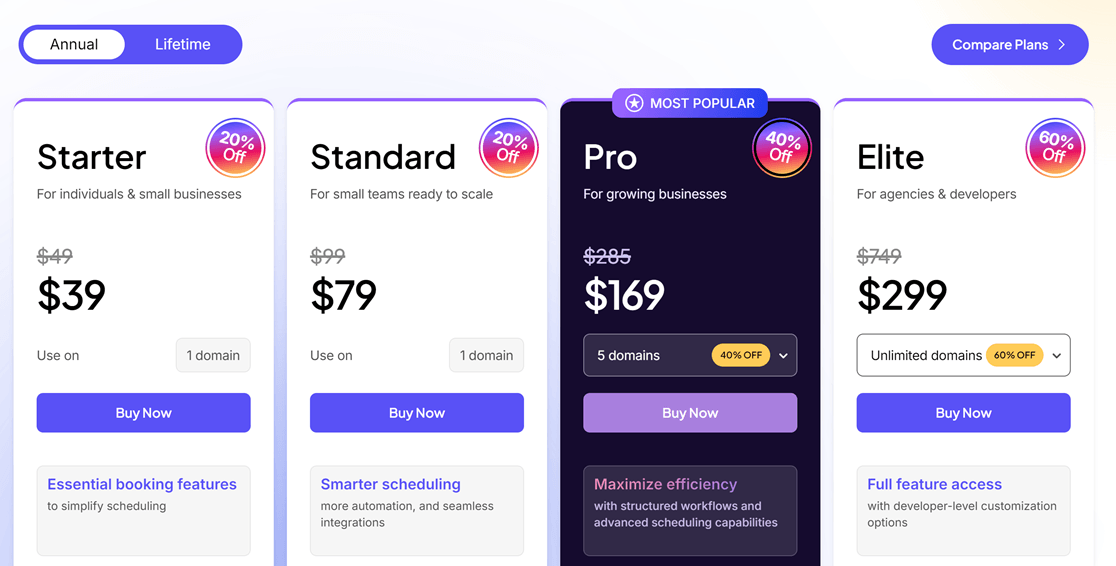
When you consider how much functionality the plugin offers, it's excellent value for money.
Amelia pros and cons
Here's a quick summary of what I like about Amelia and where it falls short.
- Pros: polished step-by-step booking wizard, handles both appointments and ticketed events, deep back-end control, group bookings and recurring appointments, wide payment and calendar integrations, and a usable free version.
- Cons: the sheer number of settings has a learning curve, the free version is fairly limited, and unlocking everything (unlimited sites, all integrations) means the Elite tier.
Frequently asked questions
Is Amelia free?
Yes, there's a free version called Amelia Lite on WordPress.org. It covers core appointment and event booking, email and SMS notifications, and Square payments. Recurring appointments, packages, custom fields, and integrations like Zoom and Stripe are reserved for the paid plans.
How much does Amelia cost?
Paid annual plans start at $49 per year for the Starter tier and go up to $259 per year for Elite, which covers unlimited sites. One-time lifetime licenses are also available. Amelia runs frequent discounts, so check the current pricing before buying.
Is Amelia worth it?
For appointment-based businesses, yes. Amelia combines a professional booking flow with detailed back-end management and a wide range of integrations, which is hard to match at the price. If you only need a basic event calendar, a simpler plugin may be a better fit.
Does Amelia integrate with Google Calendar and Zoom?
Yes. Amelia syncs two-way with Google, Outlook, and Apple Calendar, so appointments show up on your team's calendars automatically. For virtual sessions, it integrates natively with Zoom, Google Meet, and Microsoft Teams and sends customers a meeting link in their confirmation.
What are the best Amelia alternatives?
Popular alternatives include Bookly, Booknetic, and Sugar Calendar, which handles both event calendars and appointment scheduling from the team behind WPForms. For a wider comparison, see our roundup of the best WordPress booking plugins.
Can Amelia sell event tickets?
Yes. Beyond one-on-one appointments, Amelia runs ticketed events with custom prices based on ticket type, capacity, and purchase time, along with waiting lists once an event is full.
Final thoughts
Without doubt, Amelia is one of the best booking solutions available to WordPress users.
The front-end booking wizard is excellent. It looks professional, loads quickly, and is simple to use. In the back end, website owners get an impressive number of options. You can shape your booking setup to fit your business, and once everything's configured, you and your staff can manage bookings with ease.
If you run a service or events business and want one tool to handle scheduling end to end, Amelia is well worth a look. If you're still weighing your options, our guide to the best WordPress booking plugins compares the leading choices.

Related Posts


